
Look up whois information anytime you need to with this application, using the IP address, the host name, or the domain as the search criteria. #Domain whois #IP address #Ping IP #Network #Whois #Ping

Looking up the information pertaining to a certain website is something that is readily available to everyone. All they need to do is look up that site's address on a service such as "whois", revealing data about the site owner and other such details.
Why desktop alternatives exist to a solution available on a site, however, is mostly in the name of convenience. It is due to such a thing that an app like SmartWhois exists — add in domains, IP addresses, or hostnames in batch files, and export that information in notepad.
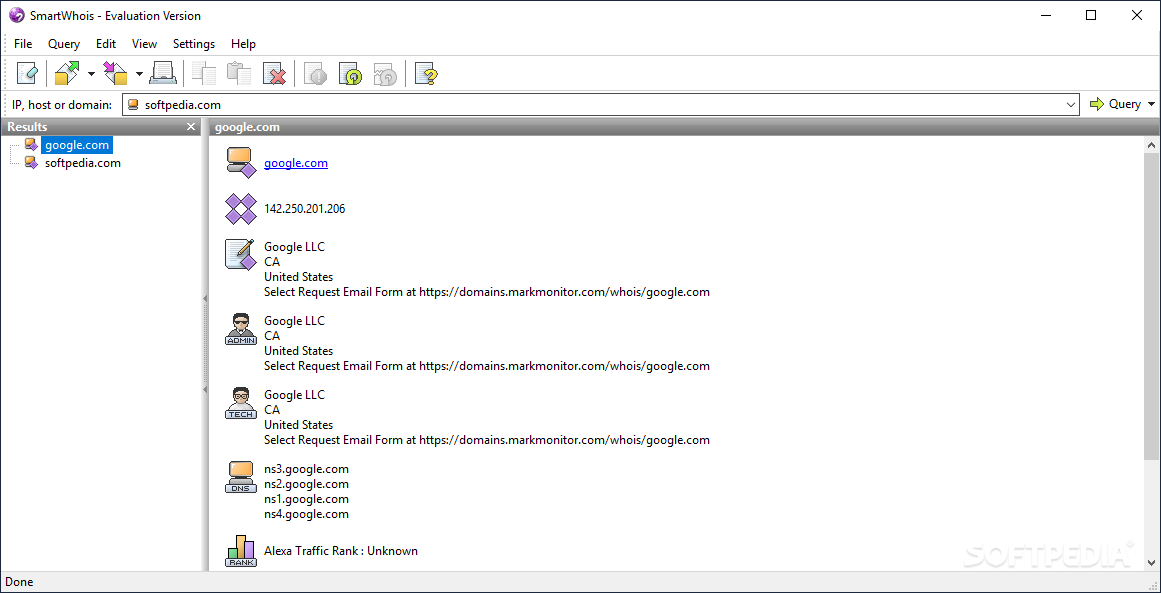
SmartWhois doesn't take much figuring out. There's a search bar near the upper part of its layout, where you can put in the IP, host, or domain of the desired address, and the app will fetch what intel it finds for that query.
The information is then presented in an orderly fashion: if you queried a domain name, the app will tell you its corresponding IP, and the country it hails from. Should it be uncovered, contact information to reach the administrator, or any other such person, will also be presented to you. DNS info and an Alexa Traffic Rank, if available, would additionally be featured.
When the app queries a host, IP, or domain, it's not certain that it will find all of the data available on it — there are cases when there is none.
You can add in the sites you want to find more about in a simple text file, feed it into SmartWhois, and it'll look all of them up, grouping them for easier access. Available to users is also the capability to export the results under a text file.
If you ever want to find certain domain info about a site, you can give this app a shot. While the processing time to fetch the info could be improved, you won't mind it when SmartWhois finds what you wanted.
Download Hubs
SmartWhois is part of these download collections: WHOIS Clients
SmartWhois 5.1 Build 302
add to watchlist add to download basket send us an update REPORT- runs on:
-
Windows 11
Windows Server 2022
Windows Server 2019
Windows Server 2016
Windows 10 32/64 bit
Windows 8 32/64 bit
Windows 7 32/64 bit - file size:
- 13.3 MB
- filename:
- sw5.zip
- main category:
- Network Tools
- developer:
- visit homepage
Windows Sandbox Launcher

4k Video Downloader

IrfanView

Bitdefender Antivirus Free

calibre

7-Zip

Microsoft Teams

ShareX

Context Menu Manager

Zoom Client

- ShareX
- Context Menu Manager
- Zoom Client
- Windows Sandbox Launcher
- 4k Video Downloader
- IrfanView
- Bitdefender Antivirus Free
- calibre
- 7-Zip
- Microsoft Teams