
Batch convert documents into numerous file formats, such as PDF, JPEG, PNG, or DWG and extract text from printable files with this converter. #Document converter #Batch converter #Convert file #Converter #Conversion #Generator
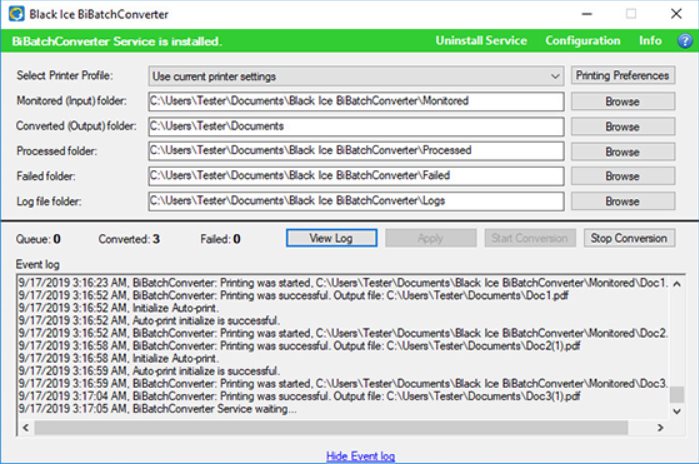
BiBatchConverter Server (Formerly FileMorph Server) is a practical software solution that can be used on the Windows Server operating systems to help you batch convert files. While at first sight, it may seem like your standard virtual printer, it is worth mentioning that the tool packs several powerful features, including automatic document conversion from the directories you are monitoring.
Even though you can set the tool to monitor the directories preferred on your computer on any given schedule, you can also do the task manually by dragging and dropping the desired documents over the interface. The tool comes with a built-in feature that enables you to email the files once the operation is completed. You can rest assured that the app pops a dialog box where you can specify the recipient.
A further noteworthy feature is the content extractor, a function that allows you to retrieve text from image documents or PDF files as plain text, text with layout or with a custom font, position, and style. Speaking of PDF, the program includes several advanced processing features, including, but not limited to file description, encryption, password handling, compression, resampling, font embedding, etc.
Lastly, it is worth mentioning that BiBatchConverter Server supports a plethora of file formats, particularly the ones that are commonly used in the office environment. Among the supported output formats, you can count JPG, PDF, BMP, PCXm GIF, PNG, DWG and a wide variety of TIFF formats.
Limitations in the unregistered version
- Limited functionality
What's new in BiBatchConverter Server 5.98.947:
- Stability improvements for BiBatchConverter Service when using the “Use a temporary directory for the converted files” option (#17216)
- Renamed “Searchable Compact PDF” file format to “Searchable PDF” (#17205)
- Stability improvement for the Save As window on some systems (#17186)
- More accurate page size calculations, fix for a thin white border appearing on the bottom on certain pages (#17207)
BiBatchConverter Server 5.98.947
add to watchlist add to download basket send us an update REPORT- runs on:
-
Windows Server 2022
Windows Server 2019
Windows Server 2016
Windows Server 2012 R2
Windows Server 2012
Windows 2008 R2 - file size:
- 188 MB
- filename:
- BiBatchConverterServerSetup.exe
- main category:
- Internet
- developer:
- visit homepage
Context Menu Manager

4k Video Downloader

Windows Sandbox Launcher

ShareX

IrfanView

Microsoft Teams

calibre

Zoom Client

7-Zip

Bitdefender Antivirus Free

- Zoom Client
- 7-Zip
- Bitdefender Antivirus Free
- Context Menu Manager
- 4k Video Downloader
- Windows Sandbox Launcher
- ShareX
- IrfanView
- Microsoft Teams
- calibre