
Print out old DOS programs using modern printers that could not get the job done thanks to this application with text customization features. #DOS utility #DOS print #Support emulation #DOS #Print #Support
Various businesses rely on documents being printed out, which can take a lot of time especially if this is a routine. However, there are many applications out there that can schedule print jobs for better time management. One of them is DOSprn with additional features dedicated to printing out DOS programs that are only compatible with text-mode printers.
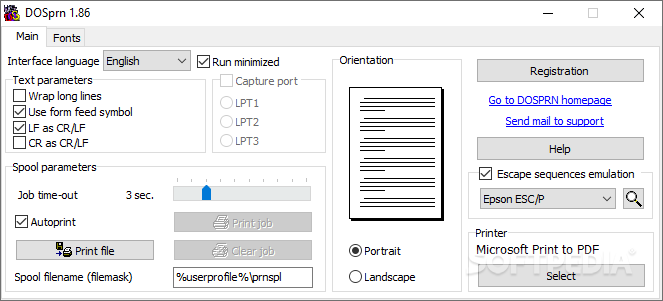
The application spends most of its time hidden in the system tray so it does not take up precious desktop space. However, the main window is also compact, with two main tabs at your disposal, one for page settings, while the other for text customization.
From the “Main” tab you can easily modify spool parameters, orientation, text parameters and select a connected printer. You can set the application to automatically start the print job as soon as files are selected and even manage them once the process starts. There is also an option that wraps long lines to make clever use of page space.
A small portion of the workspace is taken up by a preview section, but it does not display anything, which is only a pity seeing how you don't get a glimpse of the text layout until the print job is done.
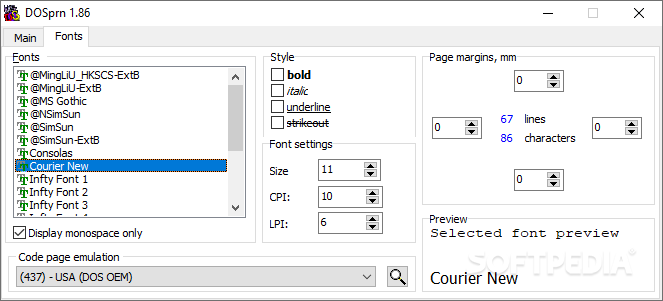
Moreover, font customization options are available, with the possibility to set margins, font size and style. Sadly, the only preview offered here is only available for a preset line of text just to get an idea of how characters look like.
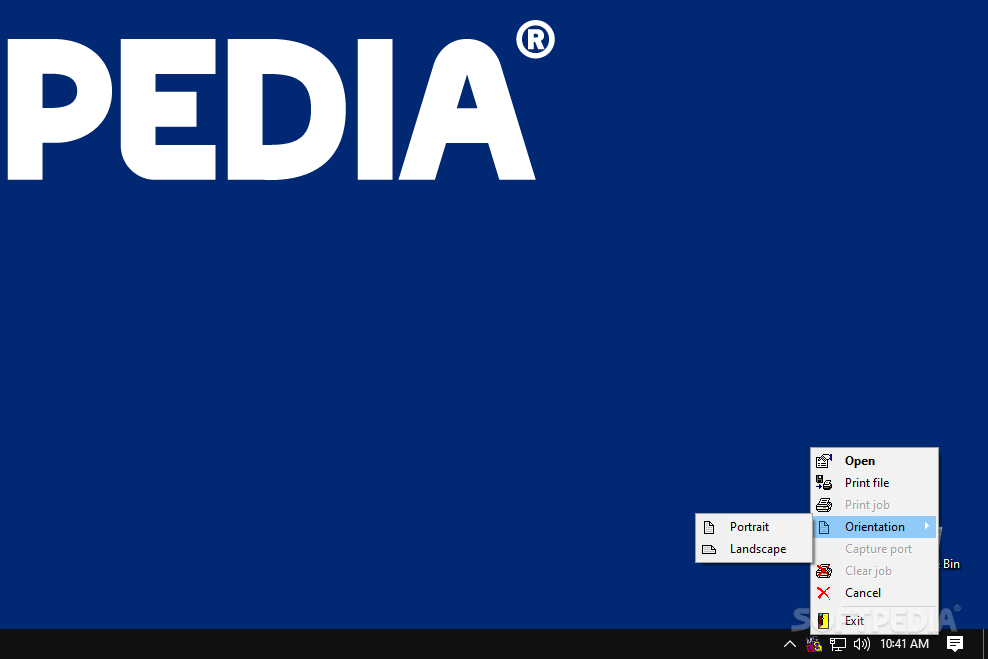
Most of the features mentioned above can also be accessed from the tray icon, such as opening a file or starting a print job, without the possibility to adjust font settings. Unfortunately, there is no implemented drop zone so you can easily drag desired files to queue for a print job.
DOSprn could have been a lot more than just a means of compatibility for older programs with newer printers. The concept is neat, nonetheless, but overall it tends to feel a little rough around the edges, with the result not being exactly what you would expect most of the times.
What's new in DOSPRN 2.00:
- Added "Print Preview" option
- Added "Print To PDF" option
- Added support serial ports COM1..COM3
- Added Save and Load settings service options
DOSPRN 2.00
 Softpedia Editor's Pick
add to watchlist
add to download basket
send us an update
REPORT
Softpedia Editor's Pick
add to watchlist
add to download basket
send us an update
REPORT
- runs on:
-
Windows 11
Windows 10 32/64 bit - file size:
- 2 MB
- filename:
- DOSprn200.exe
- main category:
- Office tools
- developer:
- visit homepage
ShareX

Context Menu Manager

Bitdefender Antivirus Free

7-Zip

IrfanView

calibre

4k Video Downloader

Zoom Client

Windows Sandbox Launcher

Microsoft Teams

- Zoom Client
- Windows Sandbox Launcher
- Microsoft Teams
- ShareX
- Context Menu Manager
- Bitdefender Antivirus Free
- 7-Zip
- IrfanView
- calibre
- 4k Video Downloader