
An efficient and reliable software application designed to help you quickly make copies of your files by using your scanner and printer as a photocopier #File scanner #Print file #Photocopier tool #Scan #Scanner #Print
Even though it is true that all-in-one devices are the norm in the office environment nowadays, in reality not everyone has the finances to invest in new equipment. Moreover, if you happen to have a scanner and a printer that are already functional, then perhaps the investment might not even make sense.
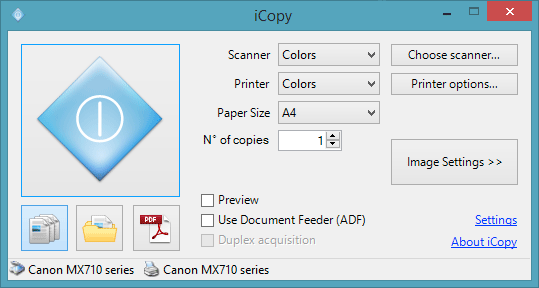
iCopy - Simple Photocopier is an application that allows you to combine these two devices into a photocopier that is easy to operate. In fact, the program comes with an intuitive interface that enables you to send documents from the printer to the scanner and vice versa with just one button.
It is important to note that the application is compatible with the Microsoft's embedded WIA standard as it uses the Windows library to be registered in your system. The app might not work with older models of printers and scanners.
Similarly to printing or scanning with a standard device, the tool allows you to preview the document before processing it. You can configure device options, such as brightness, contrast, scaling, resolution as well as the JPEG quality, for scanners.
In case you want to print the files later and or you are planning on printing photo albums, then one of your concerns might be preserving a set of parameters you tweaked before. You can rest assured that the tool allows you to save the documents or export to PDF without the need to install or use other software solutions.
If you are low on cash, but would like to enjoy the benefits of an all-in-one device, then perhaps iCopy - Simple Photocopier could lend you a hand.
System requirements
- Microsoft .NET Framework 3.5 or higher
- A WIA (Windows Image Acquisition) compatible scanner
- A printer
What's new in iCopy - Simple Photocopier 1.7.0:
- The main change in this release is the upgrade to .NET Framework 4. iCopy was using .NET Framework 2, which is deprecated and not maintained. If you have .NET 4.0 installed in your system, iCopy should work just fine.
iCopy - Simple Photocopier 1.7.0
add to watchlist add to download basket send us an update REPORT- PRICE: Free
- portable version
- Portable iCopy - Simple Photocopier
- runs on:
-
Windows 10 32/64 bit
Windows 2003
Windows 8 32/64 bit
Windows 7 32/64 bit
Windows Vista
Windows XP - file size:
- 857 KB
- main category:
- Office tools
- developer:
- visit homepage
Microsoft Teams

Zoom Client

Bitdefender Antivirus Free

Windows Sandbox Launcher

7-Zip

calibre

IrfanView

4k Video Downloader

Context Menu Manager

ShareX

- 4k Video Downloader
- Context Menu Manager
- ShareX
- Microsoft Teams
- Zoom Client
- Bitdefender Antivirus Free
- Windows Sandbox Launcher
- 7-Zip
- calibre
- IrfanView