
You can use this application when you need to convert your AutoCAD files to PDF so that you can open then without having specialized apps installed. #DWG to PDF #DXF to PDF #DWG converter #DWG2PDF #Converter #Conversion

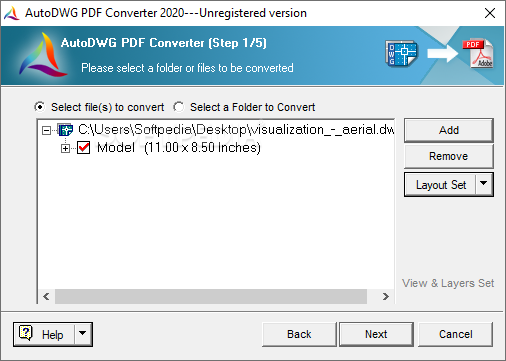
AutoDWG PDF Converter is a program with a pretty self-explanatory name - it lets you turn AutoCAD sketches (DWG, DXF, DWF) into PDF files.
The interface is based on a wizard where you can follow a few simple steps to get the job done. Importing items into the file queue can be done with the help of the file browser, folder view or 'drag and drop' method. Working with multiple entries at the same time is allowed.
You can select the model and layout, as well as configure settings regarding the output quality, color and type (e.g. merge into a single PDF file), paper size, layout, zoom mode and page orientation.
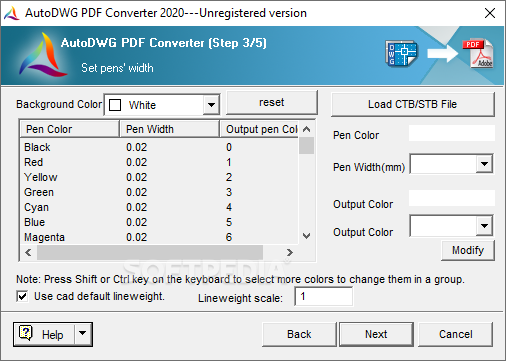
In the following steps you can modify the default background color, pen size and lineweight scale, as well as specify the output directory and filename. But you can also add watermarks, encrypt the PDF items with a password, as well as make AutoDWG PDF Converter retain TrueType fonts and fill their text.
The PDF processing tool uses a moderate amount of CPU and system memory, is very responsive and manages to preserve the original drawing quality in the output files. We have not come across any error dialogs in our tests and AutoDWG PDF Converter did not freeze or crash. There is also a help file available.
Download Hubs
AutoDWG PDF Converter is part of these download collections: Convert DWG to PDF, Convert DXF
AutoDWG PDF Converter 5.70
add to watchlist add to download basket send us an update REPORT- runs on:
- Windows All
- file size:
- 24.7 MB
- filename:
- DWG2PDF2021.exe

- main category:
- Office tools
- developer:
- visit homepage
4k Video Downloader

ShareX

Context Menu Manager

Windows Sandbox Launcher

Zoom Client

IrfanView

calibre

Bitdefender Antivirus Free

7-Zip

Microsoft Teams

- Bitdefender Antivirus Free
- 7-Zip
- Microsoft Teams
- 4k Video Downloader
- ShareX
- Context Menu Manager
- Windows Sandbox Launcher
- Zoom Client
- IrfanView
- calibre