Search Perform an advanced search query SOFTPEDIA
 
SOFTPEDIA
Updated one minute ago
HomeSubmit a program for being reviewedAdvertise on our websiteGet help on surfing our websitesSend us your feedbackGet information about our XML/RSS backend and how to use itBrowse the news archiveVisit our discussion forumVizitati forumul in limba romana


Program Finder NormalFreeware onlyShareware only

AutoSplit Plug-in for Adobe Acrobat 2.8 Report spyware 

Click to download AutoSplit Plugin for Adobe Acrobat
View more AutoSplit Plug-in for Adobe Acrobat screenshots (3)
 Downloads: 2,024
Rating: Fair (2.6/5) | Rated by: user(s)
Add to download basket     Send us update information
 Developer: EverMap Company, LLC. | More programs by this producer
 License: Trial , 99 $ to buy 
 Size / OS: 972 KB, Windows 2K/XP/2003/Vista
 Last Updated: April 3rd, 2008, 17:11 GMT
 Category: C: \ Office tools \ PDF
 Read user reviews (0) Add a review Refer to friend Subscribe
    Download AutoSplit Plugin for Adobe Acrobat

AutoSplit Plugin for Adobe Acrobat description
Advanced document splitting and page extraction plug-in for Adobe Acrobat

Adobe Acrobat is a plug-in which was developed for content extraction and advanced splitting from PDF files. Product combines industry standard document splitting methods as well as unique features for content based splitting and page extraction.

Users can extract pages from PDF documents that contain specific keywords or match text patterns. This functionality is leveraging PCRE regular expression engine (Copyright University of Cambridge) - that is also used for text processing in popular Perl language.

AutoSplit Plug-in for Adobe Acrobat also includes document security and watermarking functionality for automatic processing of output files. Plug-in features powerful and intuitive user-interface that is easy to use for power users as well as for beginners.

Here are some key features of "AutoSplit Plugin for Adobe Acrobat":

Equal Page Count
· Split PDF document into files containing equal number of pages per file.

Split By Bookmarks
· Split PDF document based on specified level of bookmark hierarchy, every bookmark section is extracted in a separate document and automatically named using bookmark title.
· In few seconds you getting a set of documents that logically split original file and every one of them even has a readable name! AutoSplit™ plug-in can automatically create folders on disk to mirror hierarchical structure of bookmark trees. All output documents are instantly organized saving you many hours of work. HTML index file can be automatically generated to provide easy file navigation.

Split At Pages With Matching Text
· Split large PDF documents that contain variable lengths groups of pages that need to be split into separate files. Reports, invoices, billing statements can be efficiently processed with this splitting method. Input document is first searched for pages that contain user specified text pattern. Document is split into multiple files at the locations of those pages.
· Pages that contain matching text become first pages in the corresponding output documents. Common approach is to match text that is present on the first page of every group of related pages (such as invoice or report). Text search can be limited to a specific area on the page to eliminate unwanted text matches.

Split By Blank Pages
· Split PDF document into multiple files at blank pages that serve as document separators. Every range of pages between blanks will be saved into separate PDF document. Blank pages will not be included into output documents. Pages should contain no PDF elements in order to be recognized as blank ones. You can even split at blank pages that are scanned images
· This powerful feature allows processing of batches of scanned fax pages. User can adjust sensitivity of the algorithm to process images that contain some amount of noise. This processing method is available in AutoSplit Pro™ package only.

Split By Page Ranges
· Split PDF document based on manually defined page ranges with multitude of available options such as odd/even pages, reverse order, page ranges from individual bookmarks and etc. This method provides a lot of flexibility and allows of mixing different page extraction methods, from manually defined page ranges to page extraction by text and content.

Extract Pages by Text Search
· Automatically find and extract pages that match keywords or text patterns. Use simple text queries or powerful regular expressions. Extract single pages, page sets or page ranges that match your search criteria. This method is used when it's necessary
extract pages that share common characteristics and group them into a single file.
· Pages can be located anywhere in the input document and do not have to be in continuous page range. This approach is preferable when number of output documents (and text patterns) is known in advance and pages need to be grouped based on a search criteria.
· The plug-in searches page text and text content of all annotations types including annotations created with "Typewriter" or "Text Box" tools.

Split by Content
· Automatically find and extract pages that contain specific PDF elements such as forms, images, links, comments, notes, rubber stamps, highlighting, JavaScript code, transparency effects, page rotation and many others. 18 different options are available.

Batch Processing Support
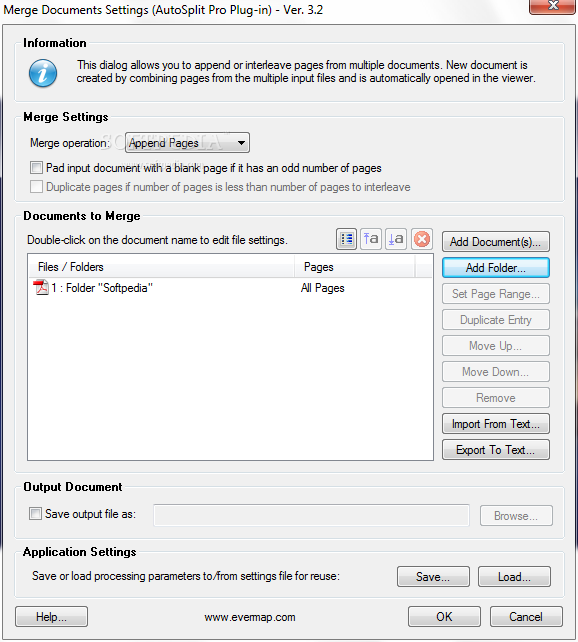
· Create your own batch sequences for processing multiple documents at once. Supports Acrobat's standard batch processing framework. Batch processing support is available in AutoSplit Pro package only. Three batch commands are installed by the plug-in: "Split Document", "Merge Documents" and "Extract Embedded Files".

Launch From Command Line
· It's also possible to launch AutoSplit batch sequence from outside of Adobe Acrobat. AutoSplit can be started from a command line or a operating system batch file. This option is available in AutoSplit Pro package only. You can also use AutoBatch plug-in if you need more flexibility in executing Acrobat batch sequences from a command prompt.

Page Ranges From Bookmarks
· Interactively define page ranges from any bookmark in the document.

Save Settings for Future Reuse
· Save and reuse complex document splitting profiles. All application options can be saved into a file for future reuse.

Automatically generated HTML index file
· AutoSplit plug-in automatically generates HTML index file that lists all output documents and links to their locations on disk. Document index is useful when splitting a large PDF file into smaller ones for faster web access. Put this index file on your web site along with PDF documents to provide fast and convenient access to large document collections.

Password Protecting Output PDF documents
· All documents can be optionally automatically secured with a password. Users will be prompted to enter a password when trying to open such documents.

Restrict Document Access
· Security options for allowing editing, printing, copying to clipboard and editing text notes can be applied to output documents. You can control level of access to the document by restricting certain operations that can be performed on the files. Document editing and printing permissions can be also password protected

Transfer bookmarks
· Transfer bookmarks to output PDF documents. Every output document can receive an exact copy of bookmark tree from the original document. The biggest surprise is that every bookmark still points to the right location!

Update links
· Update links in output PDF documents to point to correct locations. After splitting a document many links from source document can end up in different documents. Software can automatically adjust update links, so they continue to point to correct location in the same or different document. The plug-in adjusts page navigation actions for link annotations and form elements such as buttons.

Fast network access
· Linearize output PDF documents for fast Web or network access. This can greatly improve document loading time if you plan to share documents on the Web or local network.

Add Watermarks
· Add transparent watermarks to every output page (available only for "Split by Manual Page Ranges" method). Transparency level can be adjusted from 0 to 100%.

Remove Page Labels
· Automatically remove page labels in output PDF documents.

Open output documents
· Optionally automatically open all output files in Adobe Acrobat for inspection.

Email Output Documents
· Automatically distribute output documents to designated email recipients using custom email options. Each output document can be optionally emailed as a file attachment to a number of email recipients (including "CC" and "BCC" options). Documents are emailed via a default MAPI-enabled email application that is installed on the user's computer.
· All popular email clients such as MS Outlook or Thunderbird do provide this functionality. The ability to email files is only available in a "page ranges" splitting mode when a number and content of output documents is known in advance.

Overwrite Document Properties
· The plug-in provides functionality to specify custom values for the following document properties: "Title", "Author", "Subject", and "Keywords". If no custom values are specified, then the software will transfer these properties from the input document. The ability to specify custom properties is only available in a "page ranges" splitting mode when a number and content of output documents is known in advance.

Unique Output File Name
· AutoSplit creates a unique names for output documents based on the following schema: Name Prefix + Base File Name + Automatic Suffix.

Output Folder
· Output folder location can be defined for all output documents.

Name Prefix
· Many different options are available: original input file name, current date, document title, document author, document creation date. Prefix is automatically added in front of generated file name.

Base File Name
· Specify base filename (all output file names will start with it). This custom text will be added to the name prefix.

Name Suffix
· Specify suffix to automatically append to the filename. It can be either number, letter, page range, page label or text from a document. AutoSplit™ will automatically increment numbers and letters to create unique file names.

Text From Document
· It's possible to use a text extracted from a specific area in the output document as part of a filename. User can specify a rectangular area on the first page of each output document where text needs to be extracted from and used as filename suffix.

Custom File Names
· Custom file names can be used for manual page ranges method. This is because number of output files are known in advance. Custom file names can be combined with name prefix and base filename as well.

Create Folders
· AutoSplit can create folders on disk that mirror bookmark tree structure of the input document. This option is useful for documents with complex bookmark structures and when a better file organization is desired. All output documents are instantly organized into appropriate folders. Bookmark names are used for naming disk folders resulting in human readable file structure. This option is available only when splitting by bookmarks.


Requirements:
· Full version of Adobe Acrobat 5.0 minimum

Limitations:

· 30 days trial


Softpedia guarantees that AutoSplit Plug-in for Adobe Acrobat 2.8 is 100% CLEAN, which means it does not contain any form of malware, including but not limited to: spyware, viruses, trojans and backdoors.

This software product was tested thoroughly and was found absolutely clean, therefore it can be installed with no concern by any computer user.

However, it should be noted that this product will be retested periodically and the award may be withdrawn, so you should check back on this page from time to time. (click here for more information)


Related downloads IT News Popular downloads New additions   Latest reviews  
Driver Magician 3.30
An easy-to-use and powerful tool for driver backup and restoration
AVISubDetector 0.6.0.7
AVISubDetector is a tool for extraction and recognition of hard-burned subtitles from various video sources
Data Extractor 3.3
Data Extractor - Extract data, including email addresses and URLs from your files and webpage
Picture Patrol Officer XP 1.5.1
Picture Patrol Officer XP - downloads thousands of free pictures from Usenet newsgroups, saving you time
PDF U Split Desktop Edition 1.16
Automate the process of splitting multiple PDF files
Extract Message Action for InboxRULES 2.01
Extract Message Action for InboxRULES - extracts message data to contacts and file when message arrives to MS Outlook
Prodos 1.1
Prodos Professional Document Security, Protection and Management
Secure Documents 1.1
Encrypt and protect your documents with with MD5 encryption
MS Word Split, Divide and Save Pages into Separate or Multiple Files 9.0
This application will enable you to easily split several text documents.
DocCare 2.01.008
Effective Online Business Document Management Software

go to top Use the following code to link to this page:


Welcome!
Hello, Guest

Login if you have a Softpedia.com account.

Otherwise, register for one.

Main categories:
  • Antivirus
  • Compression tools
  • CD/DVD Tools
  • Office tools
  • Programming
  • Authoring tools
  • File managers
  • Desktop Enhancements
  • Internet
  • Network Tools
  • IPOD TOOLS
  • Mobile Phone Tools
  • Multimedia
  • Tweak
  • System
  • Security
  • Others
  • Science / CAD
  • UNIX
  • Windows Widgets
  • PORTABLE SOFTWARE

  • Week's best:
  • Adobe Media Player 1...
  • Registry Mechanic 8....
  • BitSpirit 3.3.2.263
  • AnyDVD 6.4.5.6
  • Firefox 3.0.1 / 2.0....
  • AutoCAD 2009
  • Norton AntiVirus 200...
  • Norton Internet Secu...
  • The Bat! Professiona...
  • WinRAR 3.80 Beta 3 /...
  • GMail Drive shell ex...
  • DAEMON Tools Lite 4....
  • UBCD4WIN 3.2.0
  • Adobe Reader 9.0.0 /...
  • Total Commander Ulti...
  • System Mechanic 8.0....
  • Adobe Acrobat Profes...
  • iPhone PC Suite 1.0....
  • Portable Firefox 3.0...
  • MPlayer for Windows ...
  • Vista Codec Package ...
  • Windows Live Messeng...
  • WinBubble 1.73
  • Kaspersky Anti-Virus...
  • Malware Removal Tool...
  • Royale Noir Theme fo...
  • IBM Lotus Symphony 1...
  • Adobe Dreamweaver 10...
  • Adobe Fireworks 10.0...
  • BitDefender Total Se...
  • © 2001 - 2008 Softpedia. All rights reserved.
    Softpedia™ and Softpedia™ logo are registered trademarks of SoftNews NET SRL.
    Copyright Information | Privacy Policy | Terms of Use | Contact Softpedia | Update your software | Archive