
Simple-to-configure tool that helps you convert image files (e.g. JPG, JPF, PNG, BMP, TIF, EMF) to PDF or XPS file format, while offering support for batch processing. #JPEG to PDF #Image to PDF #Image to XPS #JPEG2PDF #Image2PDF #Convert

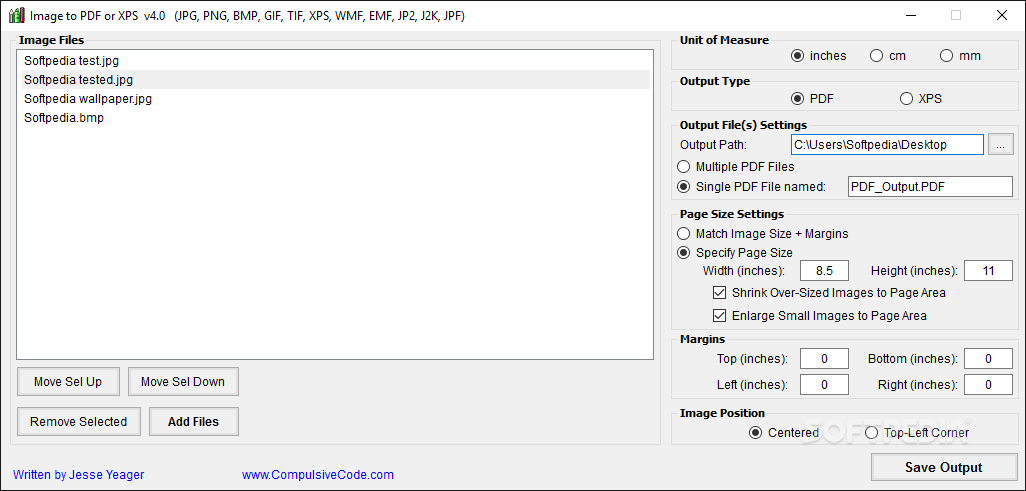
Image to PDF or XPS is a small Office tool that you can use to convert JPEG images to PDF files. What the title doesn't tell you is that the freeware also supports JP2, J2K, JPF, PNG, BMP, TIF, EMF and WMF files. Even though it is supposed to also convert GIF images, this format does not seem to be actually supported.
Thanks to the fact that the entire application is one executable file, no installation is needed – just download the package, unzip it and then run the tool. The main window is as intuitive as possible, allowing beginners and experts alike to generate the PDF files they need.
Options are limited in Image to PDF or XPS since you can convert one or several files at a time, select the output destination, then save them as PDF files. The application does not offer you the possibility to create a new folder for the new output files, so you have to do it manually if that's the case.
In the page size settings, you can match the image size plus the margins, specify the page size (in inches, cm, or mm), shrink over-sized image to fit the page, or enlarge small photos to fit the page. You can manually set up the margins, and choose for the picture to be positioned either in the center or top-left corner. You have the option to convert the pictures to a single PDF or XPS file or multiple ones. Keep in mind that GIFs are displayed in the output as stilled images not animated.
Unfortunately, when you convert some image files and then add a new file to save as PDF, all previous files will be converted once more if you do not remove them from the list. This task can become troublesome when selecting bulk files from multiple paths. The easiest way is to wait until you have everything in place, after which you can make the conversion.
Image to PDF or XPS is a handy utility that you can use to save several image types as PDF, or use them to create complex PDFs (articles, essays, eBooks etc). However, its limited functions might not satisfy the requirements of professional users.
Download Hubs
Image to PDF or XPS is part of these download collections: PDF Makers, Convert Image to PDF
Image to PDF or XPS 5.1.8795.16525
add to watchlist add to download basket send us an update REPORT- PRICE: Free
- runs on:
-
Windows 11
Windows 10 32/64 bit
Windows 8 32/64 bit
Windows 7 32/64 bit
Windows Vista 32/64 bit - file size:
- 514 KB
- filename:
- ImageToPDForXPS.zip
- main category:
- Office tools
- developer:
- visit homepage
Zoom Client

Context Menu Manager

Windows Sandbox Launcher

calibre

ShareX

4k Video Downloader

7-Zip

Bitdefender Antivirus Free

Microsoft Teams

IrfanView

- Bitdefender Antivirus Free
- Microsoft Teams
- IrfanView
- Zoom Client
- Context Menu Manager
- Windows Sandbox Launcher
- calibre
- ShareX
- 4k Video Downloader
- 7-Zip