
Speed up your Acrobat Reader by applying a few simple tweaks to remove browser integration, remove its recent file history, and more. #Speedup Adobe Reader #Adobe Reader optimizer #Disable splash screen #Adobe Reader #Optimizer #Optimize

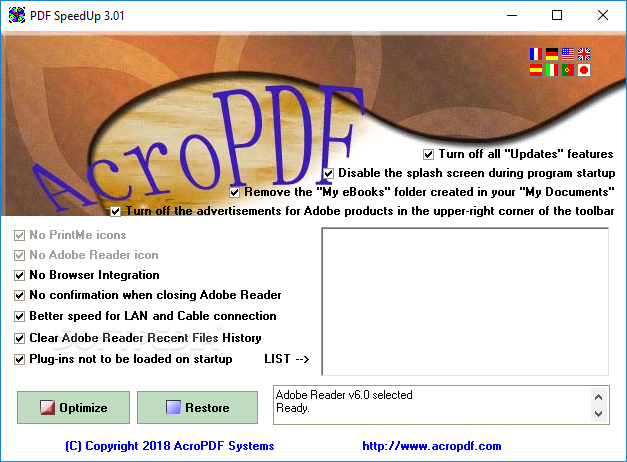
PDF SpeedUp is an easy to use Windows software solution designed to increase the loading time of Adobe Reader and thus open PDF files a bit faster.
It may all sound like a tool addressed to experienced users, but PDF SpeedUp isn't such a complicated app, relying on intuitive features and easy to configure options.
Truth is, you may need to know a thing or two about Adobe Reader, but everything's actually very straightforward and it takes just a minute to optimize your PDF viewer.
All features are grouped in a single window, so the whole so-called optimization process comes down to checking the options you want and hitting the “Optimize” button.
You can for instance turn off all “Updates” features, disable the splash screen, eliminate advertisements in the toolbar, disable browser integration, clear Adobe Reader recent files history and block plug-ins at startup.
Besides the fact that it also supports multiple languages, including French, German and Japan, the program can work with Adobe Acrobat 5 and newer, but also with Adobe Reader 6 and newer.
Since it's such a simple solution, PDF SpeedUp runs on low resources and doesn't affect system performance at all, regardless of the Windows version you're using on your computer.
On the good side, PDF SpeedUp is clearly an effective product and does what it says with minimum configuration. On the other hand, it lacks many important features and even if it boasts so intuitive features, it doesn't include a help manual to guide users.
PDF SpeedUp is a handy piece of software that can be safely used by beginners and those with a bit more computer experience alike, relying on a very straightforward approach and simple interface.
PDF SpeedUp 3.01
add to watchlist add to download basket send us an update REPORT- runs on:
-
Windows 10 32/64 bit
Windows Server 2012
Windows 2008
Windows 2003
Windows 8 32/64 bit
Windows 7 32/64 bit
Windows Vista 32/64 bit
Windows XP 32/64 bit
Windows 2K - file size:
- 589 KB
- filename:
- pdfsu.exe
- main category:
- Office tools
- developer:
- visit homepage
IrfanView

7-Zip

Bitdefender Antivirus Free

Windows Sandbox Launcher

ShareX

Microsoft Teams

4k Video Downloader

Zoom Client

calibre

Context Menu Manager

- Zoom Client
- calibre
- Context Menu Manager
- IrfanView
- 7-Zip
- Bitdefender Antivirus Free
- Windows Sandbox Launcher
- ShareX
- Microsoft Teams
- 4k Video Downloader