
Automatically save your edits and modifications periodically #Automatically save #Edit save #Changed save #Save #Automatically #Edit
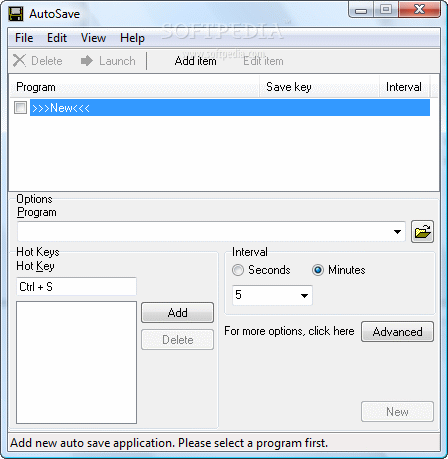
ATopSoft AutoSave - automatically save your edit/changed periodically.
Auto backup Adobe Photoshop, MS Word, Excel and PowerPoint documents before auto saving.
Almost all kinds of editor -- text editor (notepad, Word, etc), graphics editor (Photoshop, Paint Shop Pro, etc) and other kinds of editors -- can be automatically saved by AutoSave.
By using AutoSave, you can easily protect your work from forgetting save your work manually.
Using ATopSoft AutoSave can save your time and your money.
A backup file saved by AutoSave is exactly the same file saved by the application you are using, such as Photoshop, Microsoft Office, but with a different file name.
To restore a backup file, you only need to rename the backup file from OriginalFileName.bak to OriginalFileName.
For example, if the original file name is myfile.doc, the backup file name is myfile.doc.bak, then you simple need to rename the file name from myfile.doc.bak back to myfile.doc.
Limitations in the unregistered version
- 14 days trial
- Startup nag window.
- Export/Import feature is unavailable.
- The maximum auto save application count is 1.
What's new in ATopSoft AutoSave 2.40:
- Add support for Adobe Illustrator and InDesign.
ATopSoft AutoSave 2.40
add to watchlist add to download basket send us an update REPORT- runs on:
- Windows All
- file size:
- 597 KB
- filename:
- autosave.exe

- main category:
- Office tools
- developer:
- visit homepage
7-Zip

IrfanView

Microsoft Teams

Context Menu Manager

calibre

Bitdefender Antivirus Free

ShareX

Zoom Client

Windows Sandbox Launcher

4k Video Downloader

- Zoom Client
- Windows Sandbox Launcher
- 4k Video Downloader
- 7-Zip
- IrfanView
- Microsoft Teams
- Context Menu Manager
- calibre
- Bitdefender Antivirus Free
- ShareX