
View NFO files which contain ASCII art and other types of character formats in a practical environment which can show text in custom font specifications. #NFO Viewer #Open NFO #View NFO #NFO #ASCII #Viewer

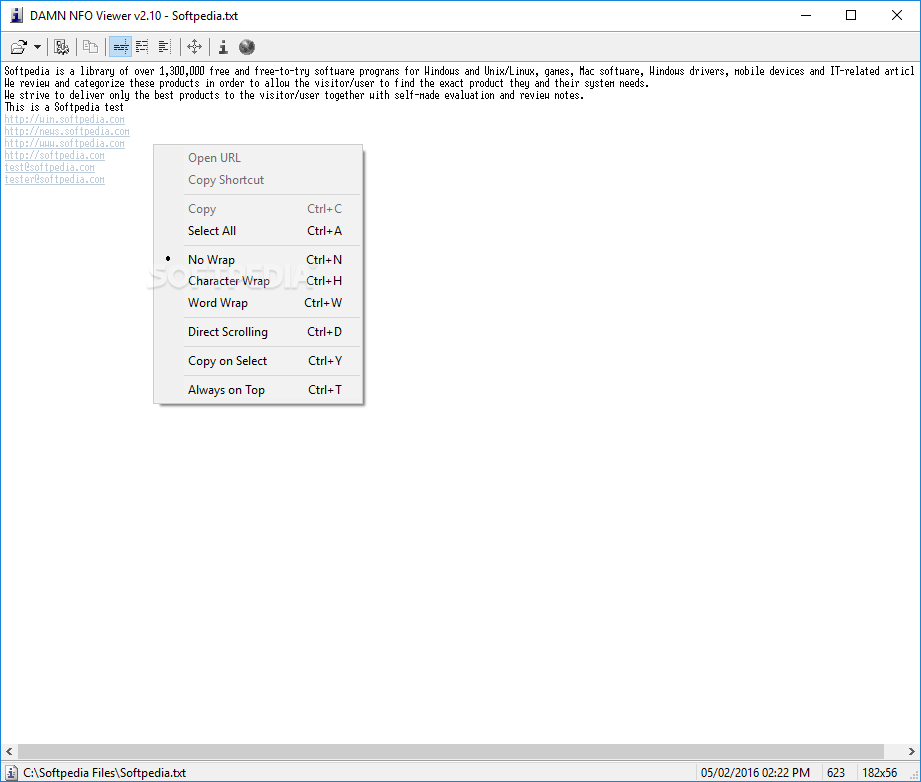
Opening files that contain ASCII art is a task that Windows can do by default, but there are some specialized tools that offer a bit more to anyone who is interested. DAMN NFO Viewer is a tiny application that can lend you a hand when trying to open documents in formats like NFO, DIZ or TXT files. Many users rely on Notepad to address this problem, but this particular software solution offers some extra features.
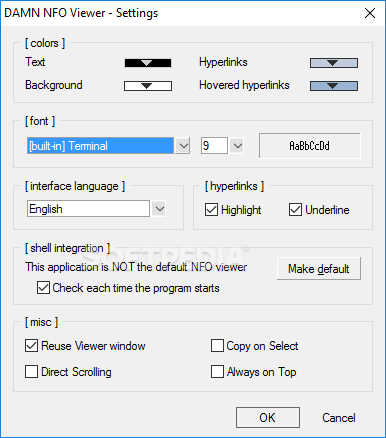
The installation process doesn't pose major problems and takes very little of your time. The application has a simple interface and a basic settings menu that enables you to configure a couple of options to make it even easier to use.
DAMN NFO Viewer has a handy copy-on-select function that automatically copies the text you select, just like the feature we've seen in mIRC some years ago. It comes with drag and drop support, a separate feature to set background and text colors, as well as word wrap support, similar to Notepad.
In case you work pretty often with NFO files, it’s possible to have it used as your default viewer right before setup is done. Files can be opened through drag and drop, and you’re allowed to view files under formats like NFO, DIZ, and TXT.
The good thing about DAMN NFO Viewer is that it has a customizable appearance, so you can change some visual settings to make it a bit more appealing. This utility sports shell integration and has Unicode support, as well as three word wrapping modes and smart line breaking.
To cut the long story short, DAMN NFO Viewer is a tiny tool that does exactly what its name suggests: helps you view NFO files that contain ASCII Art and other types of information. The application is definitely worth a try and in case Notepad isn't exactly what you're looking for, be sure to give this little but powerful program a go.
Download Hubs
DAMN NFO Viewer is part of these download collections: Text Editors, NFO Viewers, Open NFO
What's new in DAMN NFO Viewer 2.10.0032.RC3:
- DAMN NFO Viewer now registers itself as handler for text/nfo MIME type
- Fixed a bug with incorrect language autodetection after first-time install
- Added built-in cyrillic fonts (codepage 866); Russian language dll must be installed if you want to use them.
DAMN NFO Viewer 2.10.0032.RC3
 Softpedia Editor's Pick
add to watchlist
add to download basket
send us an update
REPORT
Softpedia Editor's Pick
add to watchlist
add to download basket
send us an update
REPORT
- portable version
- DAMN NFO Viewer Portable
- runs on:
- Windows All
- file size:
- 263 KB
- filename:
- DAMN_NFO_Viewer_v2-10-0032-RC3.exe
- main category:
- Office tools
- developer:
Zoom Client

Windows Sandbox Launcher

Context Menu Manager

ShareX

Microsoft Teams

Bitdefender Antivirus Free

4k Video Downloader

7-Zip

IrfanView

calibre

- 7-Zip
- IrfanView
- calibre
- Zoom Client
- Windows Sandbox Launcher
- Context Menu Manager
- ShareX
- Microsoft Teams
- Bitdefender Antivirus Free
- 4k Video Downloader