
Encrypt and decrypt text using this Java-based application that generates keypairs and has extra tools for creating password, address and crypto books #Security suite #Privacy protector #Data secure #Security #Privacy #Protector


MyPrivacyKey is a software application designed to encrypt data and protect it from unauthorized parties. It uses public-key cryptography, generates key pairs and collects random data in order to hide your sensitive information as efficiently as possible.
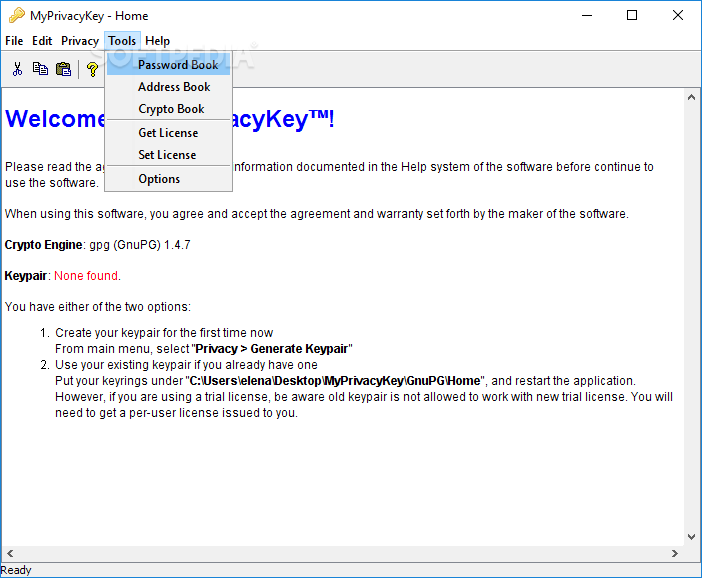
The tool utilizes GnuPG as its cryptographic and doesn't require installation. However, you must have Java Runtime Environment installed to be able to work with it properly. After reaching the main app window, you can get started by generating a keypair.
This involves specifying a keypair display name, email address, command and passphrase, which has to be confirmed before saving the keypair. It's possible to create as many keypairs as you want as well as to manage them. To encrypt information, you can type or paste the text in the dedicated area, point out the saving location, pick a keypair, and optionally apply a digital signature to the new document.
MyPrivacyKey also has a feature for verifying the integrity of encrypted data. You can access extra tools for putting together password, address and crypto books. As far as program settings are concerned, you can ask the tool to display sensitive information in tables as well as set the duration for keeping the passphrase cache before clearing it.
Unfortunately, MyPrivacyKey is no longer supported so it will not receive any further updates and it can no longer be purchased. However, you can still download the trial version from Softpedia and use it with the limitations listed on this page, as well as activate the full version if you have a license key.
The app encrypted data rapidly in our tests and had minimal impact on the computer's performance. It worked smoothly on Windows 10. All aspects considered, MyPrivacyKey offers a simple solution for encrypting data using keypairs.
MyPrivacyKey 0.1 Build 123
add to watchlist add to download basket send us an update REPORT- runs on:
-
Windows 10 32/64 bit
Windows 8 32/64 bit
Windows 7 32/64 bit
Windows Vista 32/64 bit
Windows XP
Windows 2K - file size:
- 29.2 MB
- filename:
- MyPrivacyKey.zip



- main category:
- Portable Software
- developer:
Bitdefender Antivirus Free

4k Video Downloader

ShareX

Zoom Client

Microsoft Teams

IrfanView

calibre

Context Menu Manager

7-Zip

Windows Sandbox Launcher

- Context Menu Manager
- 7-Zip
- Windows Sandbox Launcher
- Bitdefender Antivirus Free
- 4k Video Downloader
- ShareX
- Zoom Client
- Microsoft Teams
- IrfanView
- calibre
