
Enhance the perfomance of your PC. #Boost Performance #Optimize Performance #Performance Booster #Tweak #Optimize #Boost

After some time, the computer starts running a little slower than it did when you first got it or after a fresh Windows reinstall. Actual Booster Portable is a small utility that can improve the overall performance of the PC.
The program has a small interface that is quite easy to figure out.
As mentioned, Actual Booster is an app that helps users improve the overall performance of their PC so as to increase its speed. Basically, it allocates the majority of your CPU power to the currently active app or game.
Thus, the programs running in the background won't take power away from the ones you're actually using.
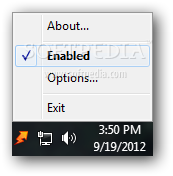
The utility acts as a standalone app and doesn't require any other tools to function. It is displayed as a simple icon in the taskbar area that gives you access to various settings by accessing the context menu.
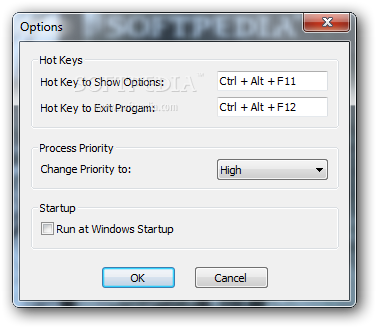
The app can be configured to an extent by accessing the context menu. Actual Booster can be set to run at system startup, so you can benefit from it immediately as you start up the computer.
You can have the app change the process priority to any of the available levels. By default, the feature is set to "High"; you can modify it to "Idle", "Below Normal", "Normal", "Above Normal" and "Realtime".
The app supports shortcuts which enable you to view the "Options" area or to exit the program entirely. These may easily be changed to a user-defined combination.
Since this program is portable, it doesn't require that you install it on the computer; it can run from all types of removable media, such as flash drives.
The bottom line is that Actual Booster Portable is a nice program that can speed up the computer. Inexperienced individuals should find it easy to use, thanks to the intuitive interface.
What's new in Actual Booster Portable 3.2:
- Confirmed compatibility with the release preview of Windows 8.
- Recorded a screencast to demonstrate how to install and use the utility.
- Full support for Windows Vista and Seven.
- Changed the main font to Tahoma.
Actual Booster Portable 3.2
add to watchlist add to download basket send us an update REPORT- runs on:
- Windows All
- file size:
- 18 KB
- filename:
- actual-booster-portable.zip
- main category:
- Portable Software
- developer:
- visit homepage
7-Zip

Microsoft Teams

Bitdefender Antivirus Free

IrfanView

Context Menu Manager

ShareX

calibre

4k Video Downloader

Windows Sandbox Launcher

Zoom Client

- 4k Video Downloader
- Windows Sandbox Launcher
- Zoom Client
- 7-Zip
- Microsoft Teams
- Bitdefender Antivirus Free
- IrfanView
- Context Menu Manager
- ShareX
- calibre