
The application changes the MAC address of any network adapter. #MAC address #MAC changer #Change MAC address #MAC #Address #Changer

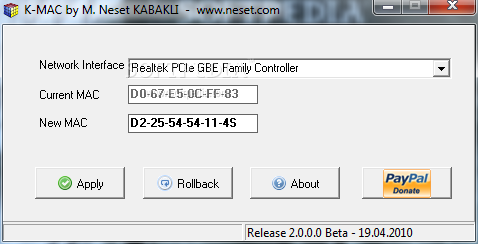
K-MAC was designed with a single goal in mind: to allow users to change the MAC address of any network adapter quickly and easily, without wasting any time.
Although it does just a single thing, K-MAC serves its purpose without a glitch, so you won't be disappointed at all if you need to do just that, modify the MAC address, and nothing more.
The great thing about this program is that it can run right out of the box. There's no need to install anything on the system you wish to use it, simply get the executable and run it.
The interface is minimal, very minimal actually, because it only enables you to choose the network interface (yes, it allows you change the MAC address of any network adapter connected to your computer), showing the current MAC and providing a special field to let you enter the new one.
Just fill in the new MAC, hit the 'Apply' and that's pretty much all there is to do. In case you change your mind and wish to come back to the original settings, press the 'Rollback' button and here you go, the default settings are back.
An important mention is that you will have to run the application as an administrator in order to be able to apply the modifications.
The conclusion is that this is one of the simplest yet most efficient MAC changing utilities out there. In case you don't want to spend your time with more complex solutions and trying to figure out the way some advanced features work, this is the tool to go for.
K-MAC 2.0.0.0 Beta
add to watchlist add to download basket send us an update REPORT- runs on:
- Windows All
- file size:
- 684 KB
- filename:
- k-mac.zip
- main category:
- Network Tools
- developer:
- visit homepage
Windows Sandbox Launcher

Zoom Client

Bitdefender Antivirus Free

Microsoft Teams

Context Menu Manager

calibre

IrfanView

7-Zip

4k Video Downloader

ShareX

- 7-Zip
- 4k Video Downloader
- ShareX
- Windows Sandbox Launcher
- Zoom Client
- Bitdefender Antivirus Free
- Microsoft Teams
- Context Menu Manager
- calibre
- IrfanView