
Command-line application that provides power users with a simple means of viewing information pertaining to executables, archives and pictures. #File Analyzer #File format #File encryption #Analyzer #Analyze #Format

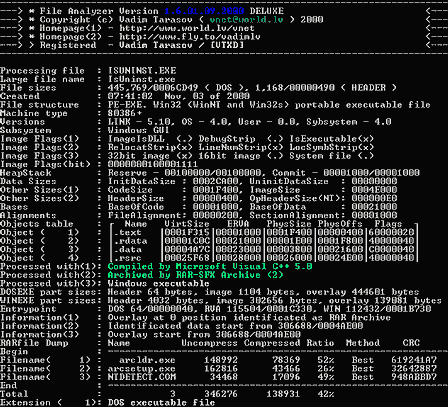
There have certainly been moments when you wanted to know exactly what's been used to create an app or view all the details of a picture. With this purpose in mind, File Analyzer was created.
Now, file identification is made easy, as this product does not require an installation process and can be run from the command line. The interface is mostly dedicated to power users, as it is not necessarily intuitive. It displays a regular command-line layout and therefore, beginners might have a hard drive getting around it.
When loading an archive, File Analyzer shows the complete file name, the DOS file size, the date of creation and the application that has been used to process it.
With a minimal amount of effort, you can see all the files included in the archive, the name of each item, the uncompressed and compressed size and the compression ratio.
File Analyzer supports a few archive formats, out of which we mention RAR, ZIP, ACE, ICE, DWC or PAC.
It is also possible to analyze images and display information pertaining to them, such as resolution, number of colors and the date of creation. When it comes to supported file extensions, you should know it is possible to process JPG, GIF, BMP, PNG, ICO an IFF.
Last but not least, you can also analyze EXE files, and this utility is going to bring up the file structure, heapstack, subsystem, data sizes, alignments, entry points and extensions, and the list goes on. EXE, Z, LE, LX, NE, P2, DL, MP or P3 are the executable files that are supported by File Analyzer.
The computer’s performance is not going to be affected by File Analyzer as it requires a low amount of resources and the response time is also good.
Although it is not necessarily dedicated to novice users, this piece of software is efficient, yet you should know that the developer has discontinued it.
File Analyzer 1.6 12.10.2002
add to watchlist add to download basket send us an update REPORT- runs on:
- Windows All
- file size:
- 243 KB
- filename:
- File analyzer.zip
- main category:
- Programming
- developer:
IrfanView

Windows Sandbox Launcher

Context Menu Manager

7-Zip

Zoom Client

4k Video Downloader

Microsoft Teams

Bitdefender Antivirus Free

ShareX

calibre

- Bitdefender Antivirus Free
- ShareX
- calibre
- IrfanView
- Windows Sandbox Launcher
- Context Menu Manager
- 7-Zip
- Zoom Client
- 4k Video Downloader
- Microsoft Teams