WINDOWS CATEGORIES:


NEWS ARCHIVE >>
SOFTPEDIA REVIEWS >>

WEEKLY HIGHLIGHTS

DVD Cloner45
Spyware Doctor40
1Click DVD Copy40
Apollo DVD Copy40
ABC Amber BlackBer...45
Protected Music Co...40

7-DAY TOP DOWNLOAD

#
Program
Avira AntiVir
Personal - Free
Antivirus 9.0.0.415

156,527
Windows Live
Messenger 2009
14.0.8089.726

133,723
Avira Antivir Virus
Definition File
Update November 27,
2009

115,807
Nexus Radio 4.2.2
115,644
FreeZ Online TV 1.30
87,708
Y! Multi Messenger
8.x and 9.x

67,581
Microsoft Office
2010 14.0.4536.1000
Beta / 2007

65,198
DVD Shrink 3.2.0.15
47,260
Windows Live
Messenger
8.5.1302.1018

47,185
AVG Free Edition 9.0
Build 707a1765

42,129

WEEK'S BEST

  • SiSoftware Sandra ...
  • Kaspersky Virus Re...
  • Faststone Image Vi...
  • Vuze (formerly Azu...
  • Softpedia Wallpape...
  • Softpedia Wallpape...
  • Softpedia Wallpape...
  • RSSOwl 2.0.1
  • Internet Explorer ...
  • Online Armor ++ 4....
  • cFosSpeed 5.01 Bui...
  • SONY Vegas Pro 9.0...
  • Firefox 3.6 Beta 4...
  • Nokia Photos 1.6.434
  • Windows Server 200...
  • Skype Portable 4.1...
  • Google Chrome Port...
  • PCMark Vantage Bas...
  • Kaspersky Anti-Vir...
  • Microsoft Virtual ...
  • Messenger Plus! Li...
  • WinX DVD Author [F...
  • SoftPerfect Networ...
  • System Mechanic Pr...
  • Ad Muncher 4.81 Bu...
  • Windows 7 Upgrade ...
  • Pidgin 2.6.4
  • OpenOffice.org Dev...
  • VirtualDub 1.9.7 B...
  • Maxthon [Softpedia...
  • Home > Windows > Programming > Other Programming Files
     Report spyware

    Regmon 7.04

    Softpedia Pick Award
    Download button

    Downloads: 51,539  Add to download basket  Tell us about an update
    User Rating:
    Rated by:
    Very Good (4.3/5)
    112 user(s)
    Developer:

    License / Price:

    Size / OS:

    Last Updated:

    Category:
    Sysinternals | More programs
    Freeware / FREE
    264 KB / Windows All
    January 18th, 2007, 12:04 GMT
    C: \ Programming \ Other Programming Files

     Read user reviews (1)  Add a review  Refer to a friend  Subscribe


    Regmon description


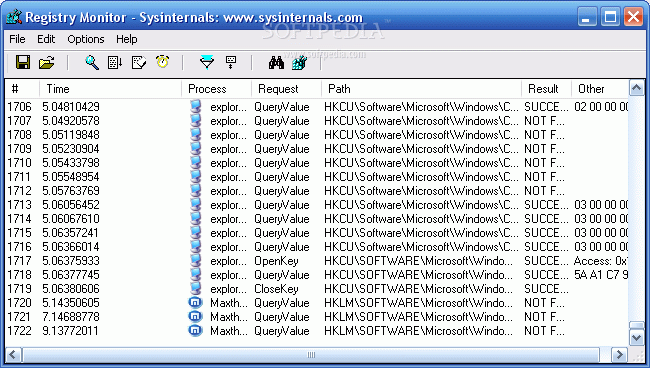
    Regmon is a monitoring utility that will show you which applications are accessing your Registry

    Regmon is a Registry monitoring tool that will show you which applications are accessing your Registry, which keys they are accessing, and the Registry data that they are reading and writing - all in real-time.

    This advanced utility takes you one step beyond what static Registry tools can do, to let you see and understand exactly how programs use the Registry. With static tools you might be able to see what Registry values and keys changed.

    With Regmon you`ll see how the values and keys changed.

    Installation and Use
    Install Regmon by copying the files to your hard drive, and start it by running Regmon.exe. Menu items and tool bar buttons can be used to toggle on and off monitoring, disable event capturing, control the scrolling of the listview, and save the listview contents to an ASCII file.

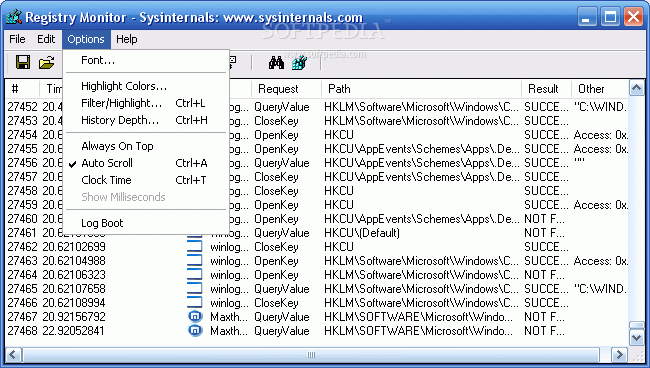
    Use the Filter dialog, which is accessed with a toolbar button or the Option|Filter/Highlight menu selection, to select what data will be shown in the list view. The '*' wildcard matches arbitrary strings, and the filters are case-insensitive. Only matches shown in the include filter, but that are not excluded with the exclude filter, are displayed. Use ';' to separate multiple strings in a filter (e.g. "regmon;software").

    For example, if the include filter is HKLM", and the exclude filter is "HKLMSoftware", all references to keys and values under HKLM, except to those under HKLMSoftware will be monitored.

    Wildcards allow for complex pattern matching, making it possible to match specific Registry accesses by specific applications, for example. The include filter "Winword*Windows" would have Regmon only show accesses by Microsoft Word to keys and values that include the word "Windows".

    Use the highlight filter specify output that you want to have highlighted in the listview output. Select highlighting colors with Options|Highlight Colors.

    Regmon can either timestamp events or show the time elapsed from the last time you cleared the output window (or since you started Regmon). The Options menu and the clock toolbar button let you toggle between the two modes. The button on the toolbar shows the current mode with a clock or a stopwatch. When showing duration the Time field in the output shows the number of seconds it took for the underlying file system to service particular requests.

    When you see a Registry value or key in Regmon's output that you want to edit, simply double click on the line that includes the reference (or use the Regedit toolbar button) and Regmon will take you directly to the specific value using Regedit.

     Softpedia guarantees that Regmon 7.04 is 100% FREE, which means it does not contain any form of malware, including spyware, viruses, trojans and backdoors. [read more >]


    TAGS:

    Registry monitor | registry tool | registry information | registry | monitor | tweak


    HTML code for linking to this page:


    Go to top

    Windows tabGames tabDrivers tabMac tabLinux tabScripts tabMobile tabHandheld tabGadgets tabNews tab

    SUBMIT PROGRAM   |   ADVERTISE   |   GET HELP   |   SEND US FEEDBACK   |   RSS FEEDS   |   ENTER NEWS SITE   |   ENGLISH BOARD   |   ROMANIAN FORUM