
Modify the timestamp of an item by opening the context menu for the selected folder and adjust the created or accessed date attributes #Change timestamp #Modify timestamp #Timestamp modifier #Timestamp #Date #Modifier

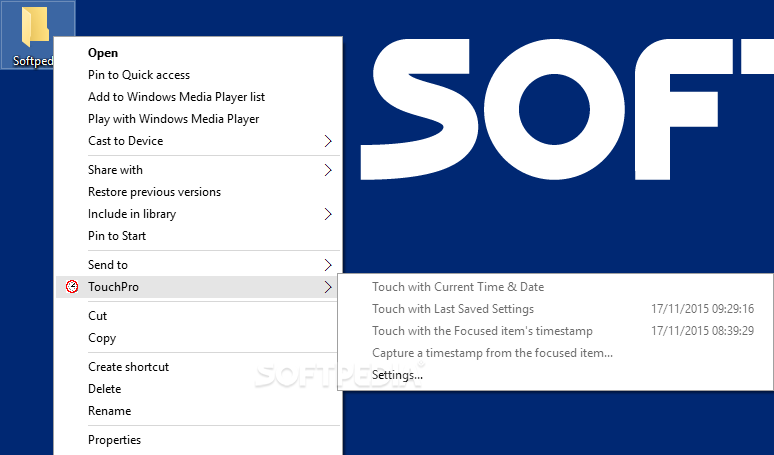
TouchPro is an approachable application that enables you to seamlessly change the file timestamps through the right-click menu. It features advanced settings that can be configured with ease even by unskilled users.
The installation procedure doesn't take long and requires minimal intervention on your behalf. Once set up, the tool gets integrated into the Windows Explorer context menu, thus giving you the possibility to change file timestamps.
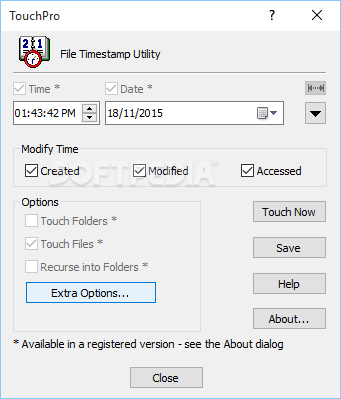
Batch processing is supported, which means that you can edit timestamps for multiple selected files at once. Before doing so, it's necessary to configure the settings.
These concern the date and time of creation, last modification and last access, which are available in the demo. By upgrading to the pro version, you can also opt for the 24-hour time and short date format, touch read-only items, picture and document time properties (Microsoft Office files), as well as view a list with failed jobs to be able to attend to them later.
Moreover, it's possible to activate message or sound alerts on successful tasks, modify the timestamps of folders, and enable directory recursive mode. Unfortunately, these pro features cannot be tested in the demo edition of TouchPro.
Tasks were carried out quickly and successfully in our tests, without hanging, crashing or prompting error dialogs. Unsurprisingly, the software program didn't hog system resources, as it needed a low amount of CPU and RAM to work properly. Command-line support is integrated as well. Too bad that the pro options cannot be evaluated in demo mode.
To sum it up, TouchPro comes loaded with straightforward and practical options for changing file timestamps. However, we've seen these features in freeware products. Nevertheless, you can test the utility for yourself.
TouchPro 6.5.3.0
add to watchlist add to download basket send us an update REPORT- runs on:
-
Windows 11
Windows 10 32/64 bit
Windows Server 2012 R2
Windows Server 2012
Windows 2008 R2
Windows 2008 32/64 bit
Windows 2003
Windows 8 32/64 bit
Windows 7 32/64 bit - file size:
- 5.3 MB
- filename:
- touchpro.zip
- main category:
- Programming
- developer:
- visit homepage
Bitdefender Antivirus Free

IrfanView

calibre

Zoom Client

4k Video Downloader

ShareX

Context Menu Manager

Microsoft Teams

7-Zip

Windows Sandbox Launcher

- Microsoft Teams
- 7-Zip
- Windows Sandbox Launcher
- Bitdefender Antivirus Free
- IrfanView
- calibre
- Zoom Client
- 4k Video Downloader
- ShareX
- Context Menu Manager