
Combine multiple waveforms in a highly customizable environment to suit any taste with the help of this practical software application. #Harmonium technology #Victorian technology #Victorian parlour #Pendulum #Victorian #Harmonium
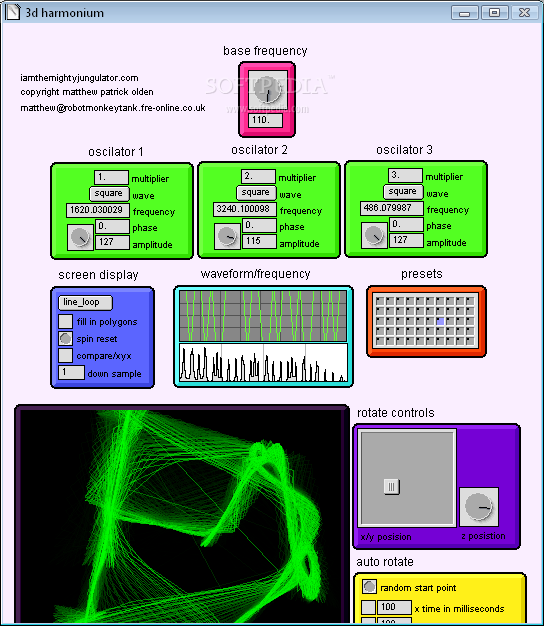
3D Harmonium is a compact application that intends to help you determine the relationship between multiple sound sources. The program simulates three sound sources and displays the waveform generated by the combination.
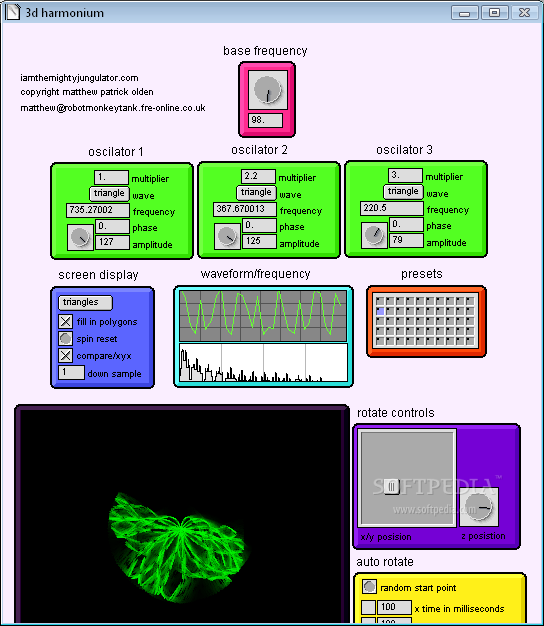
The user can adjust the sound sources by changing the wave type of each output. You can choose both sinusoidal and non-sinusoidal waveforms for any of the three oscilloscopes available in the program.
It can handle triangle, square and sawtooth waves and allows you to change their form by adjusting the amplitude of the signal and the angular frequency. The app enables you to change the amplitude of the sound by entering a value or by using the mouse in order to drag the dial in the desired position.
The goal of the application is to display the result of the waveform combination on the screen and to create an audio output for the user. The visual representation includes a waveform graph and is completed by a plot that clearly displays the course of each signal. The generated audio output is harder to hear, especially when you are combining low amplitude sounds.
The graph can be customized by selecting one of the eleven types and rotating the image in order to get the optimal view point. The program includes fifty presets that can load a specified combination of oscilloscope parameters. Unfortunately, the users cannot modify the settings in order to create a custom setup.
The interface of the program is easy to use and enables you to change the parameters and to view the results in the same window. The buttons and dials are quite small and require a good eye, especially on high resolution displays.
To sum it up, 3D Harmonium is a highly customizable tool that can help you test the relationship between three waveforms and their graphs. You'll come across no problems in accommodating due to the intuitive design and nor does it use much of your system's resources.
3D Harmonium 1.0
add to watchlist add to download basket send us an update REPORT- runs on:
- Windows All
- file size:
- 3.9 MB
- filename:
- 3d harmonium pc.zip
- main category:
- Science / CAD
- developer:
- visit homepage
4k Video Downloader

Zoom Client

calibre

Windows Sandbox Launcher

ShareX

Context Menu Manager

Microsoft Teams

Bitdefender Antivirus Free

7-Zip

IrfanView

- Bitdefender Antivirus Free
- 7-Zip
- IrfanView
- 4k Video Downloader
- Zoom Client
- calibre
- Windows Sandbox Launcher
- ShareX
- Context Menu Manager
- Microsoft Teams