
Minimalistic, intuitive calculator app with useful capabilities such as unit and currency conversion, all in a notepad-like user interface. #Scientific calculator #Currency converter #Unit converter #Calculator #Currency #Math

Calculators can get quite busy, what with the multitude of math operations that are expected of them to perform. It is no surprise then that there are initiatives to simplify it all, either by adopting a more minimalist take or looking for more intuitive alternatives.
Numara Calculator is one such example; an app designed with minimalism and intuitiveness in mind, but with a bit of a new formula. It can do currency and unit conversions and even solve intricate math functions.
When considering minimalism, one often has to think about what would suffer in the adoption of such a design philosophy. Numara Calculator doesn’t really sacrifice much — perhaps there's a bit of a learning curve to using the app, but not much else beyond that.
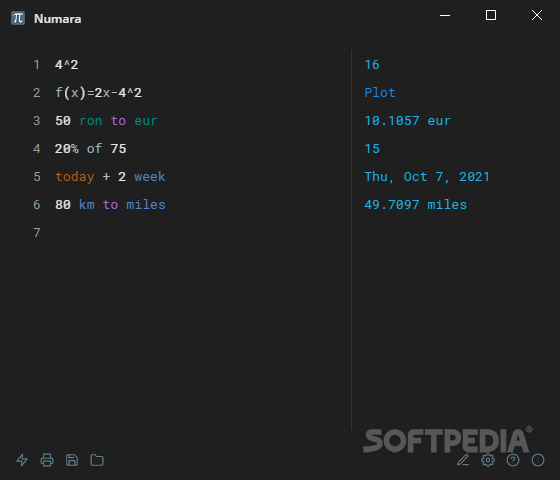
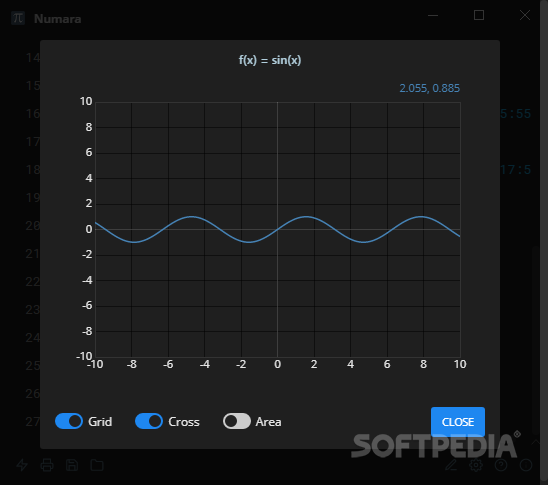
Through a notepad-like user interface, the user inputs their desired operations on the left side, with Numara displaying the result on the right. Possible operations range from basic math calculations like multiplying and subtracting all the way to the more advanced ones, such as graph functions.
Numara isn’t just a simple calculator. It could have been suited to only handling math operations — and that would’ve been fine — but there’s more to it.
The app has a currency conversion capability, by which it can convert to and from multiple worldwide currencies. It can also tell you what date it’ll be 2 weeks from now, and it can indeed also tell you that 100 kilometers is 62.1371 miles.
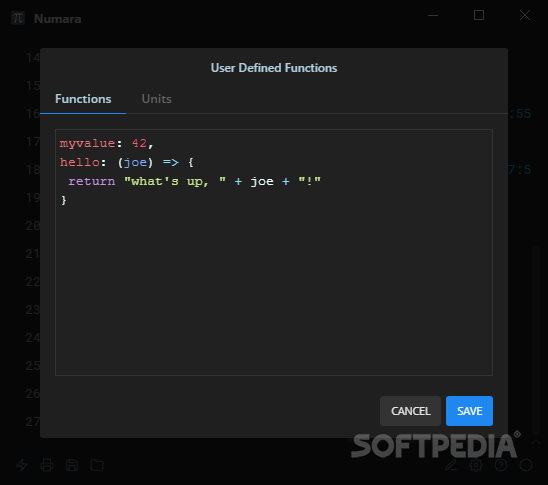
What’s more, one also has the possibility to designate user-defined functions, which return a certain response after a specific query. However, knowledge of the Javascript programming language is required for you to take advantage of the feature.
Numara looks like quite the simple calculator app, but that couldn’t be further from the truth. There’s a lot of depth to it, and it’s certainly made more for power-users than it is for the lesser.
What's new in Numara Calculator 5.0.1:
- Fixes Calculations after DATE() are always ERROR #54
Numara Calculator 5.0.1
add to watchlist add to download basket send us an update REPORT- PRICE: Free
- runs on:
-
Windows 11
Windows 10 64 bit - file size:
- 75.7 MB
- filename:
- Numara-5.0.1-x64.exe

- main category:
- Science / CAD
- developer:
- visit homepage
Context Menu Manager

Bitdefender Antivirus Free

Microsoft Teams

7-Zip

IrfanView

ShareX

Windows Sandbox Launcher

Zoom Client

calibre

4k Video Downloader

- Zoom Client
- calibre
- 4k Video Downloader
- Context Menu Manager
- Bitdefender Antivirus Free
- Microsoft Teams
- 7-Zip
- IrfanView
- ShareX
- Windows Sandbox Launcher