
An easy-to-use web browser password recovery tool for the most popular application out there featuring some very witty algorithms. #Recover browser password #Password recovery #Decrypt password #Decrypt #Decrypter #Recover

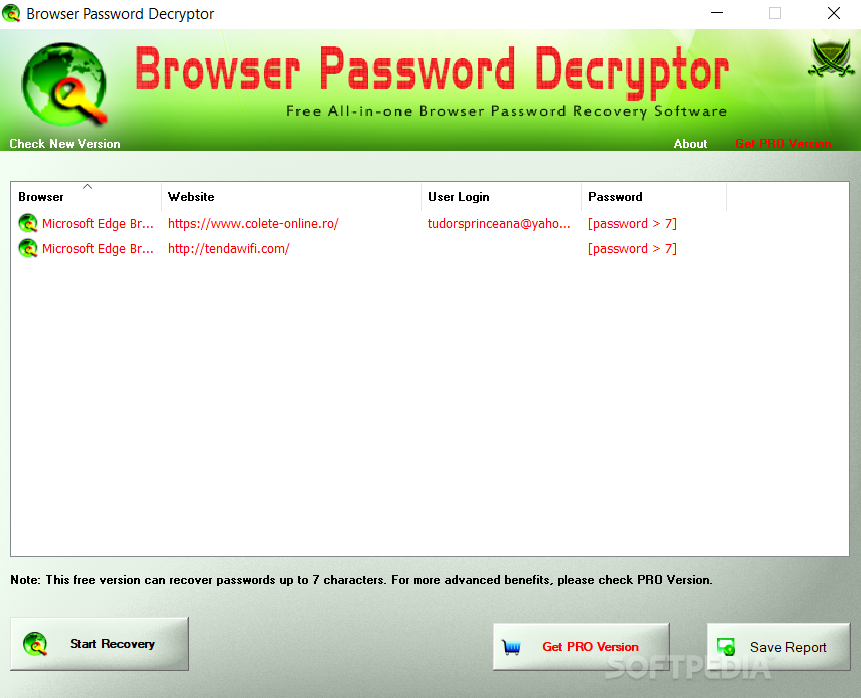
Browser Password Decryptor is a small software utility that is able to recover website login passwords, in case you have forgotten or lost them.
The user interface is simple, and it surely appeals even to less experienced users. The application is able to recover the saved login passwords from the following browsers: Firefox, Internet Explorer, Google Chrome, Google Chrome Canary/SXS, CoolNovo Browser, Opera Browser, Apple Safari, Comodo Dragon Browser, SeaMonkey Browser, and Flock Browser.
Basically, it’s extremely easy to work with this tool, since it doesn’t bundle any configuration settings. With a single click, Browser Password Decryptor is able to display the website URL, user name and password. The recovered passwords can be exported to the following file formats: HTML, XML or plain text.
No special computer skills are required for working with this tool, as it doesn’t ask you to provide the username or other details, in order to recover the passwords. It automatically displays the needed information in the main window.
During our testing we have noticed that the application manages to carry out a task pretty quickly and without errors. The program remains light on your system resources, and doesn’t affect the functionality of your web browsers in any way.
In conclusion, Browser Password Decryptor proves to be a simple but powerful tool that can help you recover website login passwords efficiently. Thanks to its clean layout and overall simplicity, it can be used by beginners and experts alike.
What's new in Browser Password Decryptor 15.0:
- Mega 2023 release supporting Windows 11 platform. Now supports password recovery from latest version of all browsers including Chrome, Firefox, Edge, Opera, Brave, Vivaldi & more.
Browser Password Decryptor 15.0
add to watchlist add to download basket send us an update REPORT- PRICE: Free
- portable version
- Browser Password Decryptor Portable
- runs on:
-
Windows 11
Windows 10 32/64 bit
Windows 2003
Windows 8 32/64 bit
Windows 7 32/64 bit
Windows Vista 32/64 bit
Windows XP 32/64 bit - file size:
- 5.2 MB
- main category:
- Security
- developer:
- visit homepage
7-Zip

Bitdefender Antivirus Free

IrfanView

Context Menu Manager

Microsoft Teams

calibre

Zoom Client

Windows Sandbox Launcher

4k Video Downloader

ShareX

- Windows Sandbox Launcher
- 4k Video Downloader
- ShareX
- 7-Zip
- Bitdefender Antivirus Free
- IrfanView
- Context Menu Manager
- Microsoft Teams
- calibre
- Zoom Client