WINDOWS CATEGORIES:


NEWS ARCHIVE >>
SOFTPEDIA REVIEWS >>

WEEKLY HIGHLIGHTS

DVD Cloner45
Spyware Doctor40
1Click DVD Copy40
Apollo DVD Copy40
ABC Amber BlackBer...45
Protected Music Co...40

7-DAY TOP DOWNLOAD

#
Program
Avira AntiVir
Personal - Free
Antivirus 9.0.0.407

197,527
Windows Live
Messenger 2009
14.0.8089.726

191,571
Avira Antivir Virus
Definition File
Update November 6,
2009

183,902
Nexus Radio 4.1.1
132,855
Windows Live
Messenger
8.5.1302.1018

114,274
FreeZ Online TV 1.30
94,065
Microsoft Office
2007

83,055
Y! Multi Messenger
8.x and 9.x

80,995
DVD Shrink 3.2.0.15
60,078
AVG Free Edition 9.0
Build 698a1730

56,394

WEEK'S BEST

  • Internet Explorer ...
  • Online Armor ++ 4....
  • cFosSpeed 5.01 Bui...
  • SONY Vegas Pro 9.0...
  • Firefox 3.6 Beta 1...
  • Nokia Photos 1.6.434
  • Windows Server 200...
  • Skype Portable 4.1...
  • Google Chrome Port...
  • PCMark Vantage Bas...
  • Kaspersky Anti-Vir...
  • Microsoft Virtual ...
  • Messenger Plus! Li...
  • WinX DVD Author [F...
  • SoftPerfect Networ...
  • System Mechanic Pr...
  • Ad Muncher 4.8 Bui...
  • Windows 7 Upgrade ...
  • Pidgin 2.6.3
  • OpenOffice.org 3.2...
  • VirtualDub 1.9.7 B...
  • Maxthon [Softpedia...
  • Spyware Doctor 7.0...
  • SUPERAntiSpyware 4...
  • Adobe Acrobat Prof...
  • Camfrog Video Chat...
  • Adobe Reader 9.2.0...
  • Foxit PDF Reader 3...
  • Microsoft Maliciou...
  • AVG Identity Prote...
  • Home / Windows / Security / Decrypting & Decoding
     Report spyware

    Protected Storage PassView 1.63

    Download button

    Downloads: 16,066  Add to download basket  Tell us about an update
    User Rating:
    Rated by:
    Good (3.7/5)
    61 user(s)
    Developer:

    License / Price:

    Size / OS:

    Last Updated:

    Category:
    Nir Sofer | More programs
    Freeware / FREE
    32 KB / Windows All
    June 30th, 2006, 08:30 GMT [view history]
    C: \ Security \ Decrypting & Decoding

     Read user reviews (0)  Add a review  Refer to a friend  Subscribe


    Protected Storage PassView description


    Protected Storage PassView - reveals the passwords stored on your computer by Internet Explorer and Outlook Express

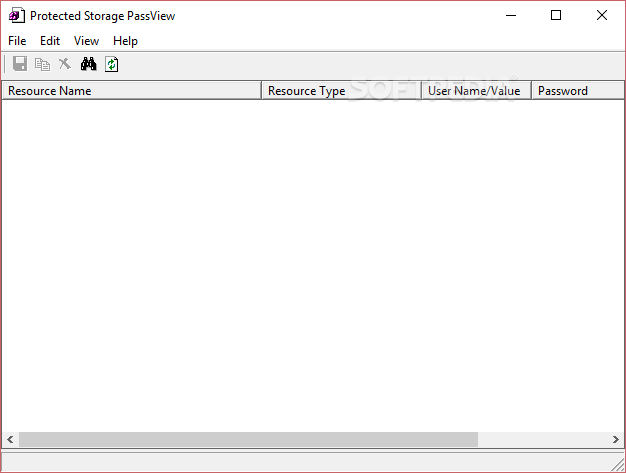
    Protected Storage PassView is a small application that reveals the passwords stored on your computer by Internet Explorer, Outlook Express and MSN Explorer.

    The passwords are revealed by reading the information from the Protected Storage.

    Starting from version 1.60, this utility reveals all AutoComplete strings stored in Internet Explorer, not only the AutoComplete password, as in the previous versions.

    This utility can show 4 types of passwords:

    Outlook passwords: When you create a mail account in Outlook Express or a POP3 account in Microsoft Outlook, and you choose the "Remember password" option in the account properties, the password is saved in the Protected Storage, and this utility can instantly reveal it.

    Be aware that if delete an existing Outlook Express account, the password won't be removed from the Protected Storage. In such a case, the utility won't be able to obtain the user-name of the deleted account, and only the password will be shown.

    AutoComplete passwords in Internet Explorer: Many Web sites provides you a logon screen with user-name and password fields. When you log into the Web site, Internet Explorer may ask you if you want to remember the password for the next time that you log into this Web site. If choose to remember the password, the user-name and the password are saved in the Protected Storage, and thus they can be revealed by Protected Storage PassView.

    In some circumstances, multiple pairs of user-name and passwords are stored for the same logon window. In such case, the additional passwords will be displayed as sub-items of the first user-password pair. In sub-items, the resource name is displayed as 3 dots ('...')

    Password-protected sites in Internet Explorer: Some Web sites allows you to log on by using "basic authentication" or "challenge/response" authentication. When you enter the Web site, Internet Explorer displays a special logon dialog-box and asks you to enter your user-name and password. Internet Explorer also gives you the option to save the user-name/password pair for the next time you log-on.

    If you choose to save the logon data, the user-name and the password are saved in the Protected Storage, and thus they can be revealed by Protected Storage PassView.
    In this category, you can also find the passwords of FTP servers.

    MSN Explorer Passwords: The MSN Explorer browser stores 2 types of passwords in the Protected Storage: Sign-up passwords and AutoComplete passwords

    What's New in This Release: [ read full changelog ]

    · Added 'Protected Storage Type' column that display the item type as appeared in the Protected Storage structure.


    TAGS:

    reveal password | website login | remember password | password | reveal | outlook


    HTML code for linking to this page:


    Go to top

    Windows tabGames tabDrivers tabMac tabLinux tabScripts tabMobile tabHandheld tabGadgets tabNews tab

    SUBMIT PROGRAM   |   ADVERTISE   |   GET HELP   |   SEND US FEEDBACK   |   RSS FEEDS   |   ENTER NEWS SITE   |   ENGLISH BOARD   |   ROMANIAN FORUM