
A security software designed to protect desktops and notebooks. #File encryption #PC security #Boot authentication #Encrypt #Authentication #Encryption
CompuSec is a security software designed to protect desktops and notebooks. It uses pre-boot authentication, single-sign-on for windows Logon, full hard disk encryption, encryption of floppy diskettes and other removable media. This software is a full version without any limitations. It is not a demo or trial version.
Pre-boot Access Control in CompuSec requires you to enter your userID and password before the system will boot up. Once authentication is completed, CompuSec will automatically log you into the windows environment and provide a screen saver lock as well.
CompuSec PC Security Suite is a security software that helps you protect your PC.
Full Hard Disk Encryption keeps your data secret. The encryption uses AES as the standard algorithm. The intelligent program uses ensures fast encryption speeds that will minimize any effect on your work.
Encryption of Floppy Disk and other removable media allows users to secure their data when transferring files between their CompuSec protected PCs. This feature will ensure that all files are encrypted and only accessible by authorized users.
CompuSec is the entry-level version from CE-Infosys. The high-end model features e-Identity (a secured electronic identity via a smart card or USB token) that will complement your password and store your digital certificates, providing strong two-factor authentication and access control. CompuSec with e-Identity also features file and folder encryption for file servers or local drives, plus IP encryption. CompuSec (freeware) can be upgraded at any time.
Main features:
Pre-boot Authentication and Single Sign On · Correct user ID and password must be entered before the operating system can be booted. · If hard disk is encrypted, the encryption key is only available after the user is successfully authenticated. · The operating system user ID, password and domain are encrypted and stored, so that users can be automatically logged into the operating system. · Only 1 set of username and password needs to be remembered. · Password synchronization can be performed for CompuSec� password and Windows password in the Active Directory.· Full hard disk encryption (including operating system, swap files, temporary files and free space) · Sector-based encryption using AES in CBC mode with 256-bit keys. · Different Initialization Vector used for each sector for higher security. · Initial encryption of hard disk can be performed either at pre-boot (slower but more secure) or in the background after the OS boots (faster). · Transparent encryption/decryption on the fly after the initial encryption. · Support for hibernation mode � data in the RAM is encrypted before storing in the hard disk.
· Transparent encryption for removable media such as diskettes, memory sticks or USB thumb drives. · CDCrypt feature for encryption of CD-R/DVD-R. · Sector-based encryption using AES in CBC mode with 256-bit keys. · Options available to user to choose whether to use the removable media in encrypted format.
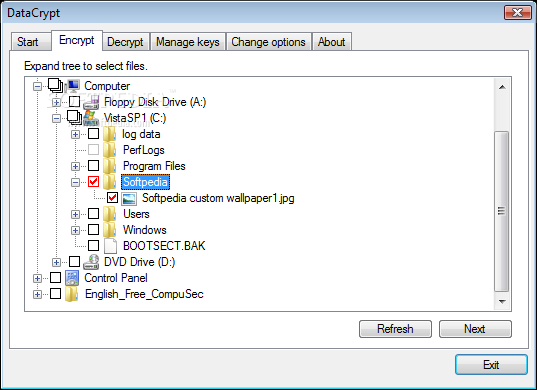
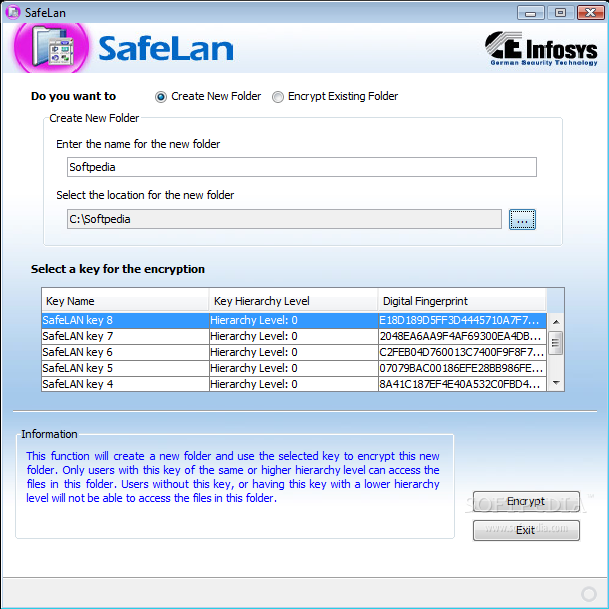
· Encrypt files and folders on a central file server without installing any other encryption software on the file server. · Encryption is performed using AES in CBC mode with 256-bit keys. · Server administrators without the correct set of keys will not be able to read the encrypted files and folders. · Separate groups of users in a strong cryptographic way. · Supports NTFS, Novell and other network-based file systems.
· Encrypt individual files using public-key encryption based on elliptic curves for key generation. · "Sealing" technology used to hide all structures in the header of the encrypted file, so as to protect against "traffic analysis" on the network. · Encrypted file can be sent safely over unsecured mediums, such as email attachments. · Can also be used as a separate software module that can be forwarded to other users.
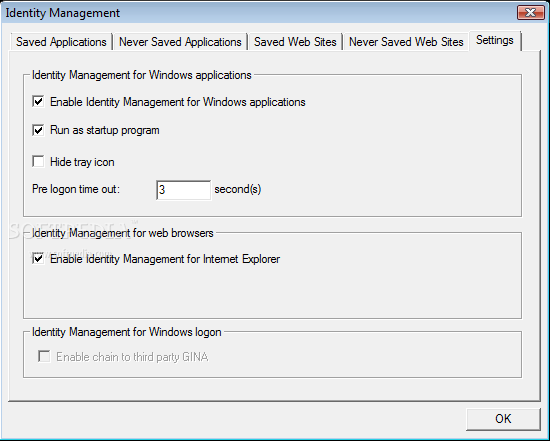
· Encrypt and stores usernames and passwords for software and web applications. · Automatically inserts correct credentials into applications requiring authentication. · Reduces the need to remember numerous user id and passwords.
· Software phone application for encrypted VoIP through the Internet. · Diffie-Hellman key generation protocol is used to provide new secure session keys for each talk. · Email addresses instead of long telephone numbers are used to contact communication partners. · Free gatekeeper service is used to find the communication partner on the network.
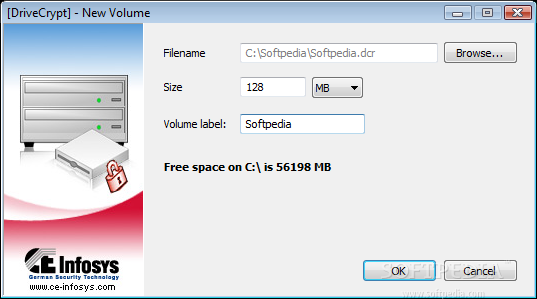
· Created an encrypted file for secure file storage. · AES with 256-bit keys used for encryption. · Container mounted as a drive. · Easy-to-use context menus for managing containers.
· Only available if the FREE CompuSec installation is GlobalAdmin Managed. · Email messages can be encrypted and then signed before they are sent out to another CompuSec user.
Requirements:
· 600 MHz Pentium III processor · 128 MB RAM · 100 MB of available hard-disk space
· 2 GHz Pentium 4 processor or higher · 512 MB RAM
System requirements
- Java Runtime Environment
- Intel or AMD processor
- 128 MB RAM
- 100 MB of free hard disk space
What's new in CompuSec PC Security Suite 5.3.0:
- Support for Windows 7 (32 & 64 bit), Windows Server 2008 & Server 2008 R2
- New and improved DataCrypt
- [DriveCrypt] for container encryption
CompuSec PC Security Suite 5.3.0
 Softpedia Editor's Pick
add to watchlist
add to download basket
send us an update
REPORT
Softpedia Editor's Pick
add to watchlist
add to download basket
send us an update
REPORT
- runs on:
-
Windows 2008
Windows 2003
Windows 7 32/64 bit
Windows Vista 32/64 bit
Windows XP 32/64 bit
Windows 2K - file size:
- 39.4 MB
- filename:
- English_Free_CompuSec_32.zip
- main category:
- Security
- developer:
- visit homepage
Bitdefender Antivirus Free

ShareX

4k Video Downloader

Windows Sandbox Launcher

7-Zip

Microsoft Teams

IrfanView

Context Menu Manager

Zoom Client

calibre

- Context Menu Manager
- Zoom Client
- calibre
- Bitdefender Antivirus Free
- ShareX
- 4k Video Downloader
- Windows Sandbox Launcher
- 7-Zip
- Microsoft Teams
- IrfanView
