
Minimal application that provides users with a simple means of monitoring how their computer is used while they are away, and comes packed with a stealth mode. #Computer keylogger #Activity recorder #Spy software #Keylogger #Logger #Spy

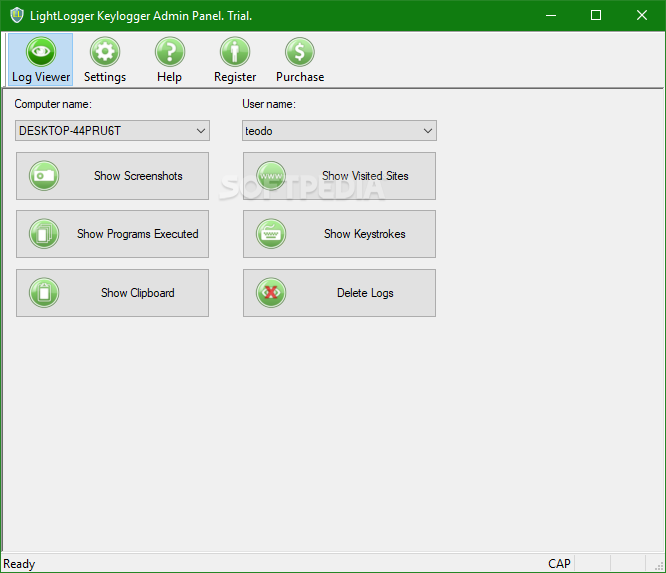
LightLogger Keylogger is a monitoring software solution that can record typed keystrokes, visited websites, Clipboard content, loaded programs and take snapshots of computer activity at a given interval.
While lots of similar applications come with many more features, LightLogger Keylogger adopted a more user-friendly approach, offering an easy to navigate interface with intuitive menus.
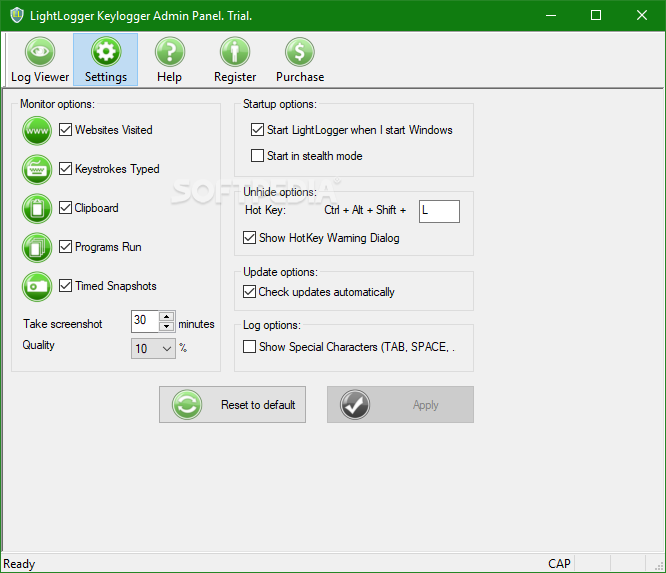
Basically, the whole program is split into two different screens, namely “Log Viewer” and “Settings.” While the first one enables you to visualize the whole activity of a certain user on the local computer, including visited websites and executed programs, the “Settings” menu allows you to configure the application and the information it saves.
While all the other monitoring options come with absolutely no settings, the only item to be configured is the screenshot utility that can be set up to grab a new picture at a specific interval. In addition to that, the user can choose a certain quality level and thus save space on the hard disk.
LightLogger Keylogger also provides a so-called “Stealth Mode” that keeps the application completely hidden from prying eyes. Of course, you can configure a hotkey to call the application at any time.
If we were to vote for an improvement, we would most likely choose a password protection feature to make sure nobody can close the application if it is spotted running on the system. Plus, dedicated features to upload the logged information on a server or send it via e-mail would be great.
Overall, LightLogger is a simple way to keep an eye on computer activity. With a few improvements here and there though, it would most likely become a top product.
LightLogger Keylogger 6.15.2.22
add to watchlist add to download basket send us an update REPORT- runs on:
-
Windows 10 32/64 bit
Windows 8 32/64 bit
Windows 7 32/64 bit
Windows Vista 32/64 bit
Windows XP - file size:
- 2.2 MB
- main category:
- Security
- developer:
- visit homepage
7-Zip

ShareX

Zoom Client

calibre

Context Menu Manager

4k Video Downloader

IrfanView

Bitdefender Antivirus Free

Microsoft Teams

Windows Sandbox Launcher

- Bitdefender Antivirus Free
- Microsoft Teams
- Windows Sandbox Launcher
- 7-Zip
- ShareX
- Zoom Client
- calibre
- Context Menu Manager
- 4k Video Downloader
- IrfanView