
Lock your folders and hard drives in order to prevent other users from accessing them without permission, using this small utility. #Lock folder #Folder lock #Secure folder #Unlock #Lock #Locker


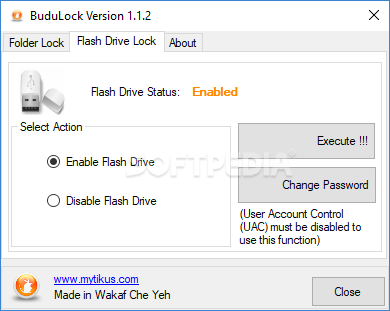
BuduLock is a freeware Windows application developed to lock any user defined folder and to block unauthorized access to USB devices.
If you’re an experienced user, this isn’t probably the first app of its kind you try, so chances are that you are amazed by the simple interface it provides.
Although a simple interface is usually the first sign of a user-friendly application, in this case it only represents a basic piece of software with a limited number of features and no configuration options.
That’s right, BuduLock is an app supposed to lock folders and USB drives that doesn’t feature any configuration settings and only a very basic interface.
With a tabbed layout, BuduLock lets you pick the folders to lock, asking you for a password that shall be used to access the content. Plus, you can enable and disable flash drives, again with a password needed to block unauthorized access.
As you can see, everything’s pretty simple, so the lack of a help file shouldn’t bother you too much. The lack of features on the other hand should.
BuduLock comprises absolutely no password reset feature and doesn’t even show the currently locked files, so there’s no way to find out which folders are locked at a given moment.
It doesn’t work at all on Windows 7, as it fails to lock any folder on the computer, even when launched with administrator privileges.
BuduLock is just an interesting idea and nothing more. It needs tons of updates, more configuration options, a revised interface and a comprehensive help file to at least dream about the elite of this particular software category.
Download Hubs
BuduLock is part of these download collections: Lock Folder
BuduLock 1.1.2
add to watchlist add to download basket send us an update REPORT- runs on:
-
Windows 10 32/64 bit
Windows 8 32/64 bit
Windows 7 32/64 bit
Windows Vista 32/64 bit - file size:
- 1.2 MB
- filename:
- BuduLockInstaller.zip
- main category:
- Security
- developer:
IrfanView

7-Zip

Zoom Client

4k Video Downloader

calibre

Bitdefender Antivirus Free

ShareX

Windows Sandbox Launcher

Microsoft Teams

Context Menu Manager

- Windows Sandbox Launcher
- Microsoft Teams
- Context Menu Manager
- IrfanView
- 7-Zip
- Zoom Client
- 4k Video Downloader
- calibre
- Bitdefender Antivirus Free
- ShareX