
Create backups of your EXE files and secure them with a password, as well as remove it, with this easy-to-use software application. #Password protector #Protect application #Add password #Password #Protector #Application
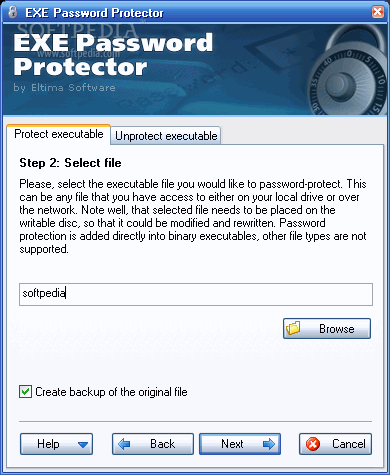
EXE Password Protector is a desktop software app built to help you protect any EXE files from unauthorized access, with as little effort as possible.
There is nothing complicated about this tool. Its interface is simple, clean and straightforward. It's so intuitive that there should be no configuration issues for any kind of users, even those less familiarized with this type of software.
Basically, all you have to do is add the file that you wish to secure, choose your password (may contain up to 50 characters), and then proceed with the task. It supports any 16-, 32- or 64-bit binary executable files.
If you have any questions about the features offered by this program, you can access the help file. It describes everything the tool can do.
When the file selection screen pops up you are given the possibility to create a backup for the original files. After the file has been secured you can protect other files or test it directly from the utility's interface to make sure that everything worked as intended.
In addition to protecting your desired files with a password, it enables you to remove the protection. The process is fast and simple. Simply add the secured files using the built-in browse button, enter the previously set password, and then proceed with the task. After the protection has been lifted, the resulted files will be identical to the original one.
It comes with a failsafe mode to make sure that you won't lock your operating system. It had a good speed during our evaluation and worked without any errors.
To sum it up, EXE Password Protector is a useful and reliable software app that enables you to protect your EXE files, as well as remove the passwords with ease. It worked smoothly during our evaluation.
EXE Password Protector 1.1.6.214
add to watchlist add to download basket send us an update REPORT- runs on:
- Windows All
- file size:
- 1.7 MB
- filename:
- exe_password_protector.exe
- main category:
- Security
- developer:
- visit homepage
Bitdefender Antivirus Free

Context Menu Manager

IrfanView

calibre

Microsoft Teams

Zoom Client

ShareX

7-Zip

Windows Sandbox Launcher

4k Video Downloader

- 7-Zip
- Windows Sandbox Launcher
- 4k Video Downloader
- Bitdefender Antivirus Free
- Context Menu Manager
- IrfanView
- calibre
- Microsoft Teams
- Zoom Client
- ShareX