
Go past boundaries imposed by Windows Explorer and remove files that you though impossible to delete or end processes without running the Task Manager. #Removal tool #Delete temp file #Erase file #Removal #Remover #Eraser


Tools provided by your operating system might not always aid you as hoped for. Luckily, there are various applications that go over the rules imposed by Windows and grant you full control. Pocket Killbox is an application that allows you to cross the boundaries imposed by Windows Explorer, by erasing items that normally you’re not granted permission to.
Here’s a scenario that any computer user got acquainted with at least once: when you try to delete a certain file or folder, Windows prompts you that you’re not allowed to due to permission restrictions.
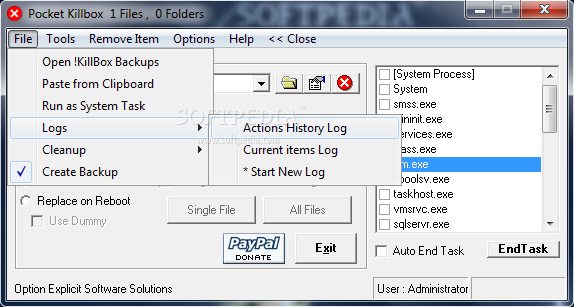
Whether you want to get rid of stubborn old junk, or just experiment with Windows' unremovable files, you are going to love Pocket Killbox. Your data is in no way in danger. Before shredding a file to pieces, Pocket Killbox automatically makes a backup that you can later delete or restore. In this case, you're safe if you accidentally delete essential files.
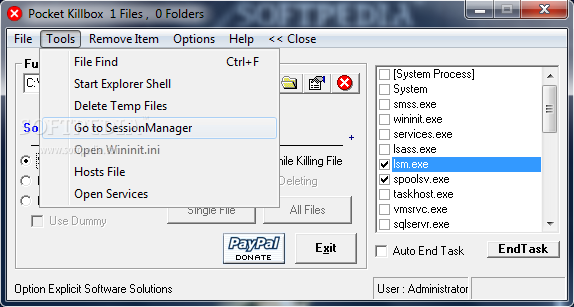
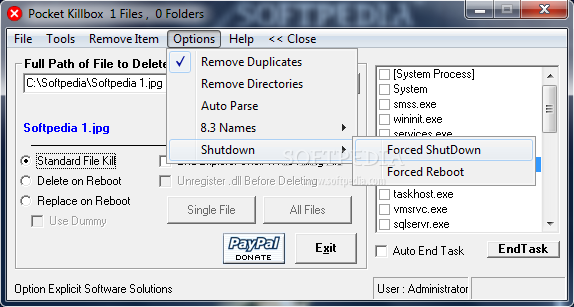
There are several deletion modes: standard, delete on reboot (requires a computer restart for the changes to take effect) or replace on reboot (includes the option of using a dummy file). For gaining extra space on your computer, the application provides you with an option to remove temporary files. As an extra feature, you can also monitor processes and end tasks. Shortcuts to Session Manager and the hosts files are available from the Tools menu.
In conclusion, Pocket Killbox is pretty outstanding, by our standards. It solves those annoying cases of ‘You don’t have permissions to delete this file’. It’s easy to use, intuitive and portable. Moreover, it prevents having your system damaged by automatically creating backups.
Pocket Killbox 2.0.0.978 Beta / 2.0.0.881
add to watchlist add to download basket send us an update REPORT- runs on:
- Windows All
- file size:
- 92 KB
- filename:
- KillBox-Beta.exe

- main category:
- Security
- developer:
Zoom Client

Bitdefender Antivirus Free

Windows Sandbox Launcher

ShareX

Context Menu Manager

Microsoft Teams

calibre

IrfanView

4k Video Downloader

7-Zip

- IrfanView
- 4k Video Downloader
- 7-Zip
- Zoom Client
- Bitdefender Antivirus Free
- Windows Sandbox Launcher
- ShareX
- Context Menu Manager
- Microsoft Teams
- calibre