
Keep your system safe and sound by having threats identified and removed, as well as damaged features re-enabled with the help of this powerful application. #Remove Restriction #Enable registry edit #Enable Regedit #Remove #Restriction #Remover

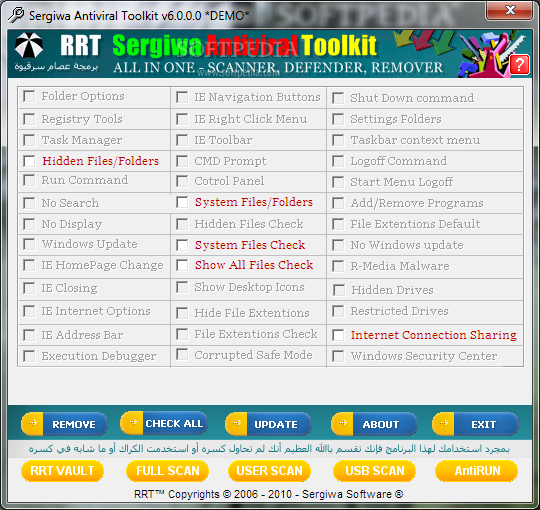
When having an active Internet connection you must be prepared for security issues. Luckily, ther are various applications that can get you out of such sticky situations. Sergiwa Antiviral Toolkit Personal is one of them, a suite of antivirus detection and removal tools that undoes the changes performed by malware, giving you back full control over your system.
Its engine is slightly different than the one commonly seen in traditional antivirus applications that rely on daily updates in order to detect malware. Instead, it uses a generic algorithm that prevents threats from infiltrating into your system.
Its interface is straightforward and intuitive, with buttons to all of its functions, no menus involved. Users can opt for one of the three scan modes: full (for an in-depth analysis of the system), user-defined (allows you to select the items to be processed) and USB (scans the contents of removable devices)
The full scanning mode enables Sergiwa Antiviral Toolkit Personal to search your computer's deepest corners for threats, but it doesn't tell you an ETA or elapsed time. You can, however, view how many files were analyzed so far. And yes, it takes a long time to complete.
While scanning is active, you can check out the dangerous agents that the app is looking for. During this time, CPU and memory are moderately used, so your computer's performance will be within normal parameters.
Sergiwa Antiviral Toolkit Personal claims it can actually re-enable features that were previously disabled by viruses. Assuming that this is true, the settings modified by malware should be restored to their original form.
All things considered, Sergiwa Antiviral Toolkit Personal is a promising antivirus system, and most certainly a very straightforward one. However, it could use improvements in terms of appearance and speed, but even so, it manages to get the job done flawlessly.
Sergiwa Antiviral Toolkit Personal 6.8.0.0
add to watchlist add to download basket send us an update REPORT- runs on:
- Windows All
- file size:
- 4.8 MB
- filename:
- RRT.exe
- main category:
- Security
- developer:
- visit homepage
calibre

Windows Sandbox Launcher

Bitdefender Antivirus Free

ShareX

Microsoft Teams

4k Video Downloader

Context Menu Manager

7-Zip

IrfanView

Zoom Client

- 7-Zip
- IrfanView
- Zoom Client
- calibre
- Windows Sandbox Launcher
- Bitdefender Antivirus Free
- ShareX
- Microsoft Teams
- 4k Video Downloader
- Context Menu Manager