
Create a backup of your chat, video or audio conversations, as well as Skype settings, with scheduling options and password encryption for more safety. #Backup skype #Encrypt backup #Schedule backup #Backup #Recovery #Rescue
Amongst the instant messaging applications that managed to make a name for themselves, Skype still sits at the winners table and will do for some time thanks to Microsoft's interest. It's widely used at home to get in touch with friends and family, but also in work environments where it's best to create a backup of important contacts and settings. Luckily, apps like EZ Backup Skype Premium come equipped with powerful tools in this regard.
Needless to say that you need to have some record of using Skype, so that the application can gather data and save it. However, the target program doesn't have to be fully functional as long as log and settings files are intact.
The application manages to make a good impression from the first few seconds. You are taken through a wizard-driven process which asks you to set up a few details, also displaying helpful descriptions and info so you don't get stuck along the way. What's more, you can access steps at any given moment in case you want to make further adjustments.
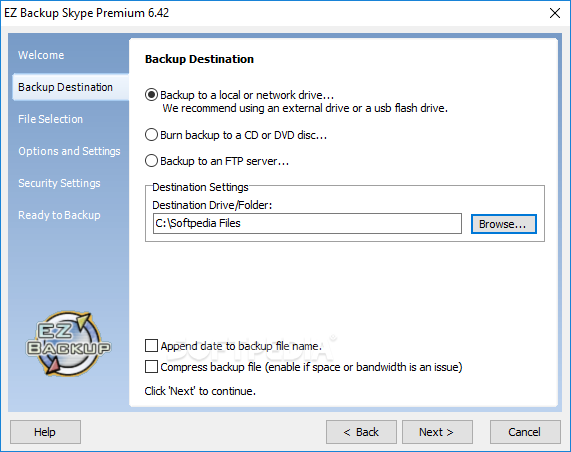
After a short introduction step, you must provide a destination. The backup file does not take up much disk space, but this only depends on the weight of your records. Options are decent, with options for local, network or USB Flash drives, optical disks, as well as a FTP server. Depending on your choice, you must fill in either a path or credential fields. You can have files compressed in case disk space or bandwidth pose problems.
The steps that follow let you manage several accessibility and security related options. As such, you can leave it in the hands of the application to detect files, or manually choose them with the possibility to add custom files and folders to be included in the backup package.
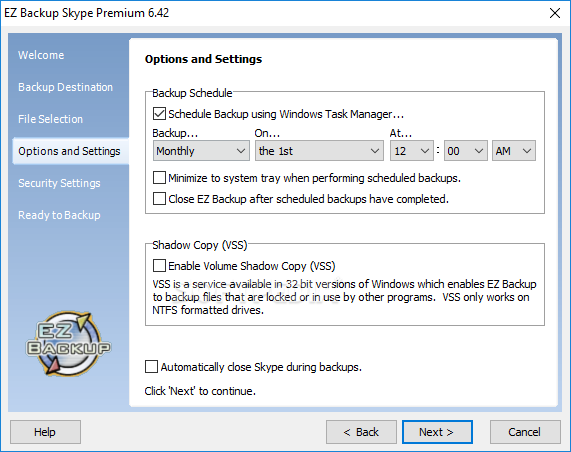
Practicality is greatly enhanced if used in a work environment thanks to an integrated scheduling feature. With this, you are able to create a task daily, weekly or monthly at a custom date and hour when the application automatically creates a backup.
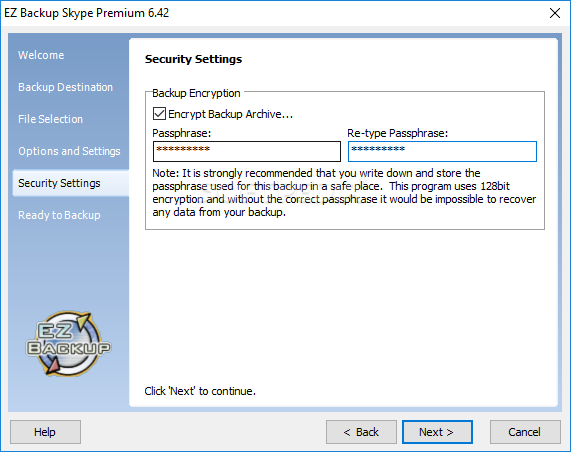
To make sure files are kept safe, the application gives you the possibility to add an extra layer of security. Using 128 bit encryption algorithm based on a password of your choice, the backup file is secured so only you can access it. Write the password down though, because it's the only way of deploying the backup if you enable encryption.
Last but not least, the application helps you all the way through, even when it comes to deploying your backup. The output file is merely an EXE that contains all you need. Running it takes you again through a series of steps to provide the password and path, with restoration taking only a few seconds.
To sum it up, instant messaging applications are packed with various features for file sharing, as well as video and audio communication, and you might want or need to keep a record of conversations. EZ Backup Skype Premium manages to live up to expectations and is highly recommended for such tasks, with a clever design that lets anyone take advantage of its features, regardless of experience.
What's new in EZ Backup Skype Premium 6.42:
- New Features
EZ Backup Skype Premium 6.42
add to watchlist add to download basket send us an update REPORT- runs on:
- Windows All
- file size:
- 4.3 MB
- filename:
- rezsm6_42.exe
- main category:
- System
- developer:
- visit homepage
ShareX

Microsoft Teams

Windows Sandbox Launcher

4k Video Downloader

Context Menu Manager

calibre

7-Zip

Bitdefender Antivirus Free

IrfanView

Zoom Client

- Bitdefender Antivirus Free
- IrfanView
- Zoom Client
- ShareX
- Microsoft Teams
- Windows Sandbox Launcher
- 4k Video Downloader
- Context Menu Manager
- calibre
- 7-Zip