
Simple-to-configure and portable program that helps you recover deleted data regardless of the file type you look for, while allowing you to select the desired drive. #Restore file #Restore folder #Clusters scan #Restore #Cluster #Scan

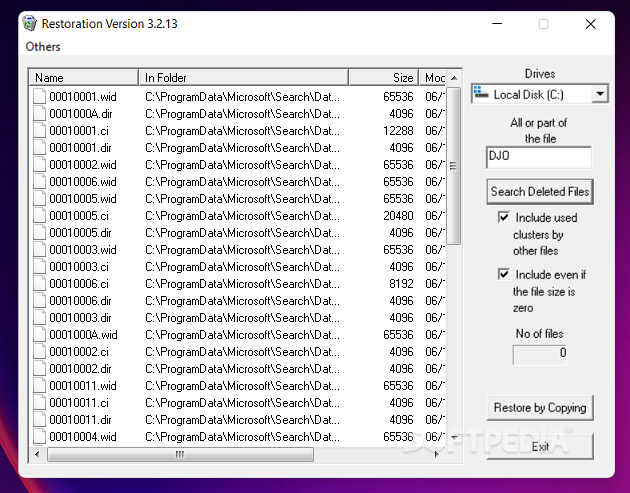
Recovering deleted files is a task that can be accomplished using a variety of tools, some of which target specific formats. Restoration is one of the apps that will help you get back erased data regardless of the file type you're after.
One of the greatest things about Restoration is that it doesn't need to be installed, so you can basically run it from a USB flash drive, a CD or even a floppy drive.
It has a nice, simple and very clean interface, with minimal settings, so you can easily take advantage of its powerful recovery features. Just pick the drives you want to scan for removed files, wait a little bit, choose the files and hit the Restore button to have them back.
Of course, scanning takes a while, especially if you have very large hard disks, but during our tests the overall search time was measured in seconds rather than in minutes. Also, the recovery was very efficient in our case, but it might sometimes fail if it has to deal with really old files that will be only partially restored.
Restoration is a pretty fast application and it works very smooth, so it won't eat up system resources while searching for files to be recovered.
Overall, Restoration is one of the first tools to try if you accidentally removed some important files, but just as any software it cannot do the impossible and bring back files erased beyond recovery.
Restoration 3.2.13
add to watchlist add to download basket send us an update REPORT- PRICE: Free
- runs on:
- Windows All
- file size:
- 163 KB
- filename:
- Restoration.zip
- main category:
- System
- developer:
Windows Sandbox Launcher

7-Zip

calibre

ShareX

Context Menu Manager

IrfanView

4k Video Downloader

Zoom Client

Microsoft Teams

Bitdefender Antivirus Free

- Zoom Client
- Microsoft Teams
- Bitdefender Antivirus Free
- Windows Sandbox Launcher
- 7-Zip
- calibre
- ShareX
- Context Menu Manager
- IrfanView
- 4k Video Downloader