
Use this vintage application to get hold of old multimedia items like photo video or sound bites from removable storage drives or digital camera cards. #Data recovery #Reconstruct data #Flash card recovery #Recovery #Recover #Restore

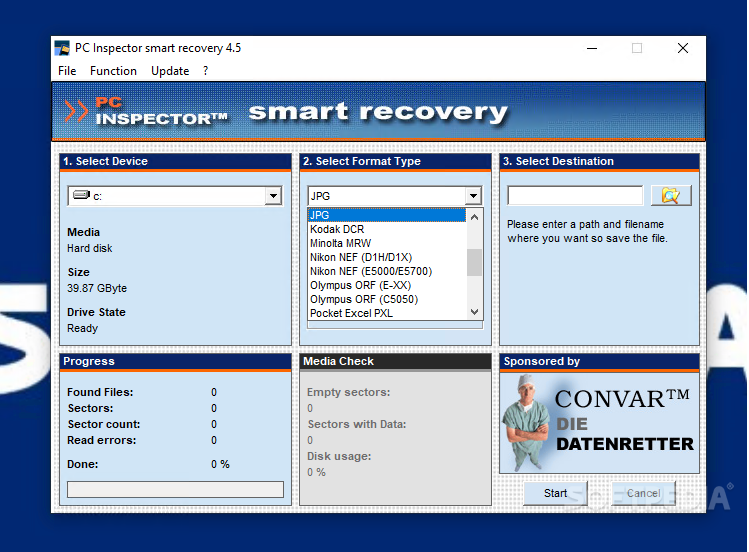
smart recovery is an old-school recovery solution for digital camera storage environments or, simply put, memory cards. The application supports Flash Card, Sony Memory Stick, Secure Digital Card, IDM Micro Drive, Multimedia Card, or Smart Media. As you can see, this tool was created for older or even obsolete devices by today's standards, so it might not be the best solution for modern cards. However, if you have precious photos or videos trapped inside such media, giving smart recovery a shot might get your memories back.
Launch the app as soon as you get the storage device is connected to your PC. Use the device selection dropdown to mark the card for scanning. smart recovery was built to retrieve pictures, videos, or audio bits from inside the storage device, so an array of formats is provided for the output items. Among basic file types such as JPG, GIF, AVI, BMP, TIFF, WAV, WMA we can find digital camera-specific formats like CR2, CRW, RAF, DSS, NEF, MRW, and more,
Once the above steps are done, ensure you select a proper output location and click Start. A progress bar will keep you informed about the total amount of items found, scanned sectors, and possible errors. Due to how old and unreliable the storage devices this application covers, expecting perfect results would be a great feat.
Also, the program in itself could prove a bit difficult on certain systems. If you are running the newest versions of OS, there are changes the application will generate some errors, or it won't even boot. However, this behavior was not consistent, but it seems important enough to highlight.
Other than that, smart recovery, an interesting piece of software history build to recover multimedia from some pieces of hardware history. In short, a handy utility to have around in case you wish to crack open the old devices it was made for.
smart recovery 4.5
add to watchlist add to download basket send us an update REPORT- PRICE: Free
- runs on:
- Windows All
- file size:
- 6.1 MB
- filename:
- pci_us_smartrecovery.exe
- main category:
- System
- developer:
- visit homepage
Bitdefender Antivirus Free

Context Menu Manager

IrfanView

Windows Sandbox Launcher

ShareX

calibre

7-Zip

4k Video Downloader

Zoom Client

Microsoft Teams

- 4k Video Downloader
- Zoom Client
- Microsoft Teams
- Bitdefender Antivirus Free
- Context Menu Manager
- IrfanView
- Windows Sandbox Launcher
- ShareX
- calibre
- 7-Zip