
Assess the performance of your HDD and run thorough hard disk drive tests to determine read and write speeds by using this powerful application. #Disk Performance #Storage Performance #Performance Measurement #Benchmark #Performance #Storage

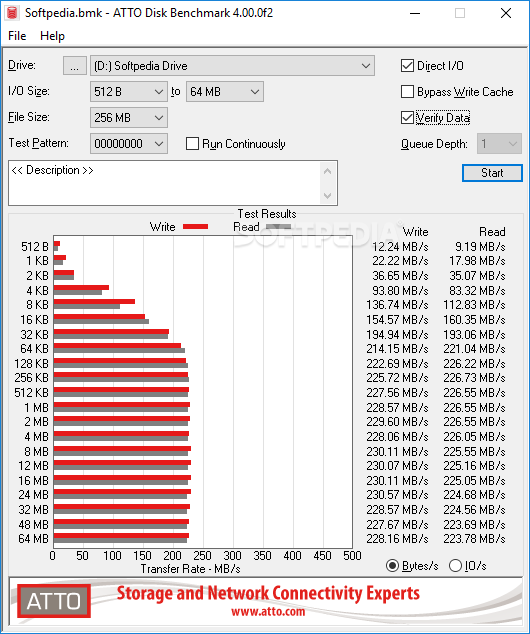
In case you notice it takes a considerable amount of time to read or write data, you might want to put it to the test and see if everything is in order. ATTO Disk Benchmark is a software solution designed to help you measure the performance of your system, by running a series of tests to determine hard disk speed.
While most benchmark utilities are extremely complicated applications with tons of features, ATTO Disk Benchmark sports a more user-friendly approach, with a simple interface, but also a comprehensive help menu with details on every single feature.
All of the ATTO Disk Benchmark's goodies are comprised in a single window, so the pre-testing configuration should be completed in just a few seconds.
You thus have to pick the drive you wish to access, the transfer size and the total length, decide whether you wish to use force write access and direct I/O. Pressing the “Start” button starts a process that seriously stresses up the hard-disk, so it's recommended to avoid working on the system while performing a new test.
Once completed, ATTO Disk Benchmark presents the test results in a professional way directly inside the main window, with a detailed graph and read / write statistics.
The application supports transfer sizes from 512KB to 8MB and lengths from 64KB to 2GB. The timed mode allows continuous testing, while the I/O option comes with multiple pre-defined settings.
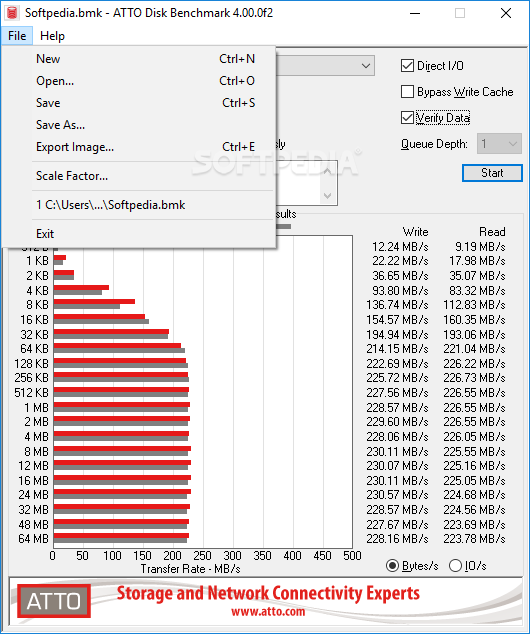
The generated report can be easily saved or printed straight from within the application, with a dedicated tool to open a previously created report and analyze it on the go.
All things considered, ATTO Disk Benchmark is one of the easiest ways to test the speed of a hard-disk and thanks to its user friendly interface, it can be safely used by beginners and more experienced ones alike. It can run on nearly all versions of Windows, being accessible to a large public.
ATTO Disk Benchmark 4.01.0f1
add to watchlist add to download basket send us an update REPORT- runs on:
- Windows All
- file size:
- 2.7 MB
- filename:
- atto-disk-benchmark-4010f1.zip
- main category:
- System
- developer:
- visit homepage
Microsoft Teams

Context Menu Manager

Bitdefender Antivirus Free

IrfanView

ShareX

4k Video Downloader

7-Zip

Zoom Client

Windows Sandbox Launcher

calibre

- Zoom Client
- Windows Sandbox Launcher
- calibre
- Microsoft Teams
- Context Menu Manager
- Bitdefender Antivirus Free
- IrfanView
- ShareX
- 4k Video Downloader
- 7-Zip