
Easily and quickly view additional information about the CD/DVD devices on your computer by selecting them in this simple application. #CD information #DVD information #CD Capabilities #Device #Drive #View

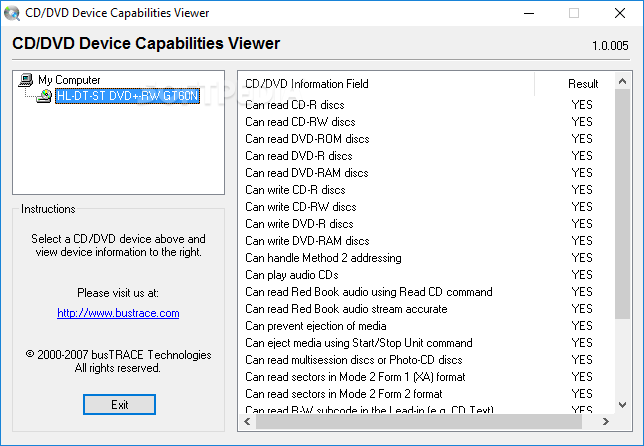
CD / DVD Capabilities Viewer is a lightweight and portable piece of software that, as the name says, lets you find out technical details regarding your CD and DVD devices. It is simple to use.
Since installation is not a prerequisite, you can just drop the executable file anywhere on the hard drive and run it directly.
As an alternative, you can save CD / DVD Capabilities Viewer to a USB flash drive or similar storage unit, and run it on any computer effortlessly.
What's more important is that Windows Registry does not receive entry updates, and files do not remain on the hard drive after program removal.
The interface of the application is represented by a regular window with an uncomplicated layout. The "what you see is what you get" concept clearly applies to the program, as there are no other options available, aside from the ones shown in the main frame.
A list of all installed CD/DVD devices is automatically displayed upon deployment. Clicking one of them reveals the device's capabilities, whether it can read and write CD-R, CD-RW, DVD-R or DVD-RAM discs, handle the Method 2 addressing, play audio CDs, or read Red Book audio using the Read CD command, to name but a few.
Unfortunately, CD / DVD Capabilities Viewer does not give you the possibility of saving this information to the Clipboard or to an external file (e.g. TXT, HTML, DOC) for further analysis.
The program barely uses CPU and system memory, so it doesn't put a strain on the computer's overall performance. It has a good response time and works smoothly, without causing the OS to hang, crash or pop up error dialogs. On the downside, CD / DVD Capabilities Viewer has not been updated for a very long time.
CD / DVD Capabilities Viewer 1.0.005
add to watchlist add to download basket send us an update REPORT- runs on:
- Windows All
- file size:
- 168 KB
- filename:
- CDIdentifier.exe
- main category:
- System
- developer:
- visit homepage
Zoom Client

calibre

Context Menu Manager

Windows Sandbox Launcher

IrfanView

ShareX

Microsoft Teams

7-Zip

4k Video Downloader

Bitdefender Antivirus Free

- 7-Zip
- 4k Video Downloader
- Bitdefender Antivirus Free
- Zoom Client
- calibre
- Context Menu Manager
- Windows Sandbox Launcher
- IrfanView
- ShareX
- Microsoft Teams