
Format USB Flash Drive and make it DOS bootable. #Format stick #Format drive #USB formatter #Formatter #Create #Generate
Remember the Disk Operating System (DOS), that ancient command-line OS with no GUI? It only took a diskette's space to boot and make use of a PC presenting a corrupted Windows installation. It was magic back in the day and it really did wonders. For the nostalgic in you, a range of tools has been created in order to re-live those unforgettable moments. You may also need it in your line of work and then you can really take advantage of MS-DOS directly from your USB flash drive.
BootFlashDOS is one of those tools and makes use of files from your Windows XP / 2003 installed operating system. It extracts them from your system and transfers them to the provided USB stick in no time at all. Thus, the application does not require any boot diskette or CD. It doesn't ask for a specific minimum drive size, so you can use any flash drive you want.
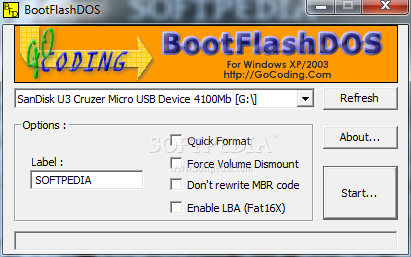
BootFlashDOS comes with a classic interface and no hidden options. Its simplicity adds to the small amount of hard drive space it takes. The program provides a handful of options starting from the USB drive selection menu and ending with the `Start` button. Once you select the target drive, you can able rename it in the `Label` field. You can also opt for `Quick Format` as well as `Force Volume Dismount` if you are in a hurry.
For those of you that don't want the MBR (Master Boot Record) to be rewritten, you have the appropriate option at hand. The `Enable LBA (Fat16X)` operation refers to the “Logical block addressing” scheme that is implemented in storage systems and it also formats your drive to the FAT16 system for better compatibility. After you pick your desired options, the job is almost done. One click of a button completes the task and you become the owner of a newly-created DOS bootable flash stick.
BootFlashDOS 1.0 Beta
add to watchlist add to download basket send us an update REPORT- runs on:
-
Windows 2003
Windows 7 32/64 bit
Windows Vista 32/64 bit
Windows XP - file size:
- 50 KB
- filename:
- BootFlashDos.zip
- main category:
- System
- developer:
- visit homepage
Zoom Client

Context Menu Manager

7-Zip

Windows Sandbox Launcher

Microsoft Teams

IrfanView

calibre

Bitdefender Antivirus Free

ShareX

4k Video Downloader

- Bitdefender Antivirus Free
- ShareX
- 4k Video Downloader
- Zoom Client
- Context Menu Manager
- 7-Zip
- Windows Sandbox Launcher
- Microsoft Teams
- IrfanView
- calibre