
Easily create a bootable drive. A real gem when it comes to creating DOS bootable drives.. #Bootable USB #Boot USB #Bootable Drive #Bootable #Boot #Optimize
Oftentimes when we need to repair something on a system or recover data when the operating system is no longer accessible, booting from an external location is a must. In order to make a device like a portable storage drive bootable, you will certainly need a specialized application that can do the job quickly and easily.
Such a utility is Bootable USB Drive Creator Tool, a very lightweight, yet quite effective tool that is ready to run right out of the box. Since it doesn't require installation, all you have to do is simply unpack the files and run the executable.
The interface of Bootable USB Drive Creator Tool is so easy to read and use that even less experienced users can have a go at using this software and successfully make an USB connected device bootable.
Besides the main purpose for which this utility was created, there is another, more simpler task it can carry out on the fly. Thus, with the help of this tiny application you will be able to format a drive and turn its file system into FAT32.
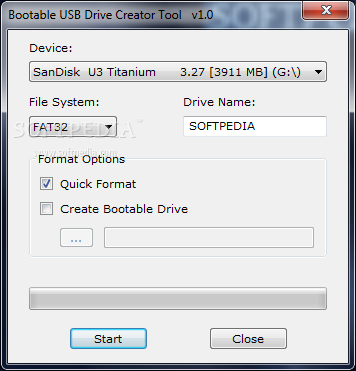
It's also worth mentioning that the software automatically detects any devices connected to the PC after the program was started. This means you don't have to refresh or restart Bootable USB Drive Creator Tool in order to have it read your flash drive.
If you have more than one device plugged in the USB ports, you can use the drop-down list to select the one that will become bootable. You can also assign a new name to the drive and even opt for a 'Quick Format'.
The last step before hitting the 'Start' button is to load the boot files. This can be easily done by choosing the folder that contains the required data. You can even use the files Bootable USB Drive Creator Tool comes with. These will allow you to make the drive boot in either FreeDOS or in MS-DOS.
All things considered, this application is a real gem when it comes to creating DOS bootable drives. It works really fast and is very easy to use bay anyone, so it's definitely worth a try.
Bootable USB Drive Creator Tool 1.0
add to watchlist add to download basket send us an update REPORT- runs on:
- Windows All
- file size:
- 301 KB
- filename:
- Bootable_USB_Drive_Creator_Tool.rar
- main category:
- System
- developer:
7-Zip

Context Menu Manager

Microsoft Teams

ShareX

Windows Sandbox Launcher

Bitdefender Antivirus Free

4k Video Downloader

calibre

IrfanView

Zoom Client

- calibre
- IrfanView
- Zoom Client
- 7-Zip
- Context Menu Manager
- Microsoft Teams
- ShareX
- Windows Sandbox Launcher
- Bitdefender Antivirus Free
- 4k Video Downloader