
An unofficial Ubuntu installer for Windows users that will bring you into the Linux world with a single click. #Install ubuntu #One click install #Ubuntu installer #Install #Installer #Ubuntu
Wubi (short for Windows-Based Ubuntu Installer) is an official deployment package for Ubuntu. Its main advantage is that it manages to perform a clean Linux installation without the need to partition hard disks.
Wubi was first issued as an independent project, but it has been merged with Ubuntu after a short while. Having been a huge success, the software was also bundled inside the Ubuntu and Kubuntu Live CDs.
Wubi’s purpose is to get Windows users acquainted with the Ubuntu environment without much effort. While an installation from a live CD remains a challenge for a considerable amount of users, Wubi adopts a simpler approach and makes it possible to install Ubuntu from a setup file rather than an ISO.
Wubi made and still makes an impression due to its simplicity and friendliness towards the Windows user. You don’t need to make special arrangements in order to use it, nor does it require advanced computer knowledge.
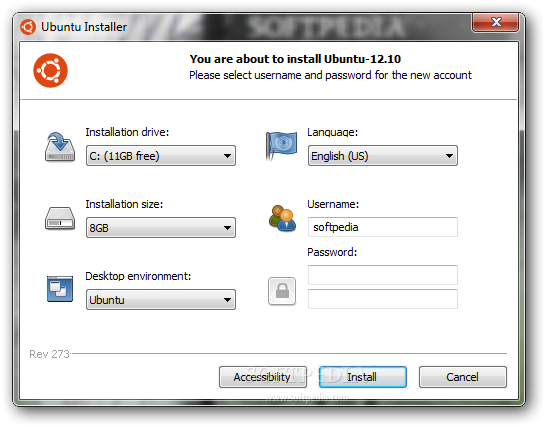
The installation process involves adjusting a few settings such as the installation drive, the deployment size (at least 5 GB of disk space are required), the username and password and last, but not least, the desktop environment you wish to use (the selection includes Ubuntu, Kubuntu, Mythbuntu, Edubuntu and Lubuntu).
Once you click the Install button, Wubi starts downloading and checking the installation files, without requiring user interventions (except for reboots). The application adds an entry to the boot menu, which means that every time you start your computer, you will be presented with two OS choices: Windows and Ubuntu. As a side note, uninstallation can be done very simply and safely, without affecting system data.
On the downside, Wubi has some shortcomings compared to the standard Live CD installation. It is more sensitive to hard reboots and does not support hibernation. Also, any problems that may cause Windows to boot incorrectly will also prevent Ubuntu from launching.
However, Wubi’s list of upsides exceeds the one of shortcomings. It’s the simplest, safest way to accommodate an Ubuntu distribution on your system from a setup file.
Wubi rev 273
 Softpedia Editor's Pick
add to watchlist
add to download basket
send us an update
REPORT
Softpedia Editor's Pick
add to watchlist
add to download basket
send us an update
REPORT
- runs on:
- Windows All
- file size:
- 2.4 MB
- filename:
- wubi.exe

- main category:
- System
- developer:
- visit homepage
Windows Sandbox Launcher

7-Zip

4k Video Downloader

IrfanView

Context Menu Manager

calibre

Microsoft Teams

Zoom Client

ShareX

Bitdefender Antivirus Free

- Zoom Client
- ShareX
- Bitdefender Antivirus Free
- Windows Sandbox Launcher
- 7-Zip
- 4k Video Downloader
- IrfanView
- Context Menu Manager
- calibre
- Microsoft Teams