
Copy and manage files and data with the help of this streamlined and user-friendly application that promises increased transfer speeds. #Copy File #Folder Copy #Move File #Copy #Move #Transfer

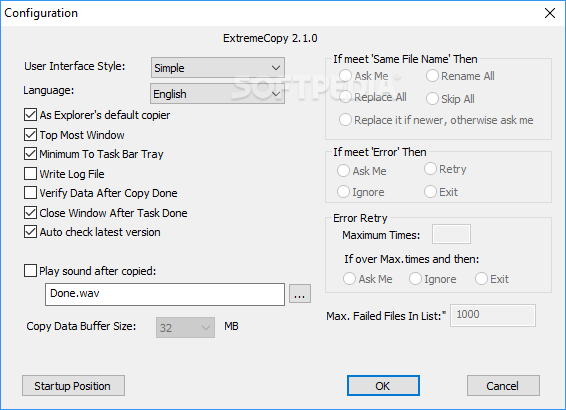
ExtremeCopy is a file copying solution that promises to increase transfer speed by up to 120 percent. It does sound impressive, that's true, but this also depends on your hard-disk speed and the number of files you copy. ExtremeCopy however comprises some very helpful features that aren't available in the standard Windows copying utility.
Once installed, you can simply copy the files just like you usually do in Windows Explorer, with the only difference represented by the pasting action. ExtremeCopy renames the standard Windows paste entry in the Context Menu to “Windows Paste”, while it uses the regular “Paste” option.
This means that hitting “Paste” starts the copying process handled by ExtremeCopy and brings up a dialog that shows the copied file, destination, a progress bar, speed, elapsed and remaining time. What's more, you can pause the process and skip the currently copied file.
There are some important options available too, so you can configure the sound to be played whenever the copying task comes to an end, adjust the copy data buffer size and decide the action to be performed when a file with the same name already exists in the destination folder.
ExtremeCopy truly increases download speed and the way it interacts with the user is pretty helpful because you don't have to launch a new window to handle file transfers. The app works flawlessly on all Windows versions and doesn't ask for administrator privileges unless you want to use the Context Menu entries.
Overall, ExtremeCopy comprises a very interesting feature package and comes with a feature that really sets itself apart from the rest of the crowd. It's easy to use and bundles the essential options to appeal to both rookies and more experienced users.
What's new in ExtremeCopy 2.1.0:
- Added queue for multiple tasks running in the same time if operate same storage
- Added bug report feature once ExtremeCopy crash
- Added auto check latest version
- More options in configuration
ExtremeCopy 2.1.0
add to watchlist add to download basket send us an update REPORT- runs on:
-
Windows 10 32/64 bit
Windows 8 32/64 bit
Windows 7 32/64 bit
Windows Vista 32/64 bit
Windows XP 32/64 bit - file size:
- 2.2 MB
- filename:
- ExtremeCopy-2.1.0-std-32bits.zip
- main category:
- System
- developer:
Context Menu Manager

Windows Sandbox Launcher

Zoom Client

IrfanView

ShareX

calibre

7-Zip

Bitdefender Antivirus Free

4k Video Downloader

Microsoft Teams

- Bitdefender Antivirus Free
- 4k Video Downloader
- Microsoft Teams
- Context Menu Manager
- Windows Sandbox Launcher
- Zoom Client
- IrfanView
- ShareX
- calibre
- 7-Zip