
A program that is able to scan your computer for locked files and folders in order to unlock them, which also features a DLL unloading functionality. #Unlock file #Force delete #File deletion #Unlock #Unlocker #Lock

Finding locked files and folders on your computer can be quite a nuisance, especially when you know you didn't lock them yourself. As with much of anything on an OS, this can be caused by a multitude of reasons: a file may be used by a specific process, a folder may prevent access due to some user account conflict, and so on — getting to the bottom of these issues is quite simple, but it cannot be denied that the experience can be frustrating.
NoVirusThanks File Governor stays true to its name in a couple of ways: for one, it's not a virus, and it can most certainly help you manage some of your files through its functions.
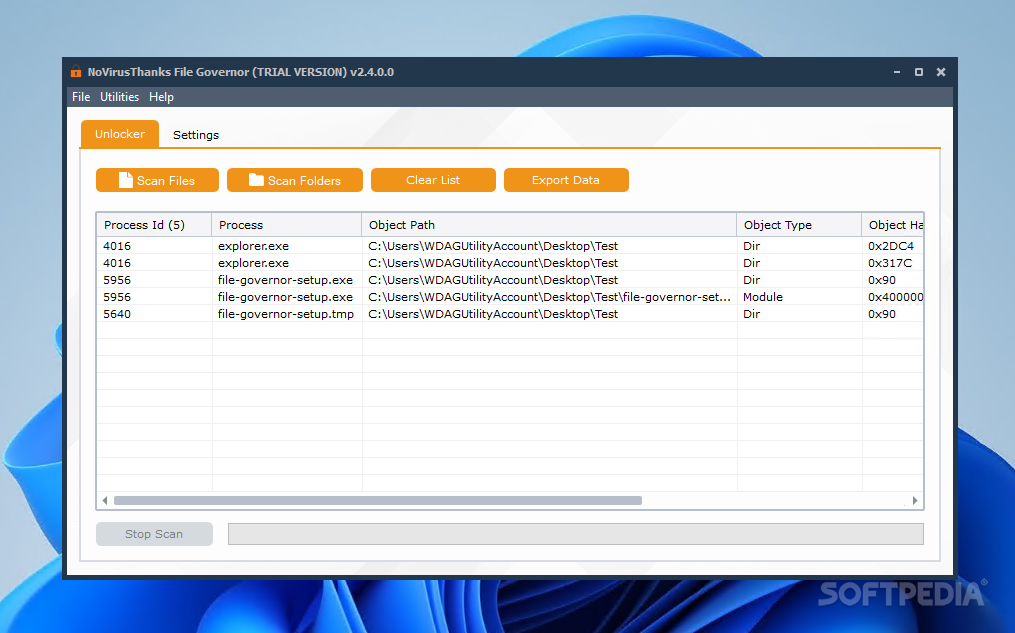
Through a tool like this, users can manage their locked files in a more handy manner. The interface can best be defined as a practical one, as all the functions that you need are immediately within reach. Select the files or folders you want to work with, and the program will commence the scanning.
After the scanning finishes, you'll be able to see all the data pertaining to the analyzed element. Information such as process name and ID, object path, type, as well as code, will be presented to you in the interface. Click the process that concerns your locked file, and a few options will appear: open the file's containing folder, kill its processes, as well as even look it up on Google and VirusTotal, to name a few.
Unlock some more
The app also affords users the ability to unload DLL modules, which is useful when you want to close handles that remained opened. This can help quite well when dealing with malware, too, among other things.
Equipped with the Unlock All function, the program can also be quite convenient to use: clicking Unlock All will trigger the program to resolve all locked handles, all in just one click.
NoVirusThanks File Governor works quite well, so if you have any files or folders on your drive that need unlocking, this one might be of aid
What's new in NoVirusThanks File Governor 2.6.0.0:
- Improved support for high-DPI
- Improved installer and uninstaller scripts
- Updated NoVirusThanks License Manager to latest version
- Minor fixes and optimizations
NoVirusThanks File Governor 2.6.0.0
add to watchlist add to download basket send us an update REPORT- runs on:
-
Windows 11
Windows 10 32/64 bit
Windows 8 32/64 bit
Windows 7 32/64 bit - file size:
- 46.1 MB
- main category:
- System
- developer:
- visit homepage
Windows Sandbox Launcher

4k Video Downloader

7-Zip

Bitdefender Antivirus Free

Context Menu Manager

Zoom Client

calibre

ShareX

IrfanView

Microsoft Teams

- ShareX
- IrfanView
- Microsoft Teams
- Windows Sandbox Launcher
- 4k Video Downloader
- 7-Zip
- Bitdefender Antivirus Free
- Context Menu Manager
- Zoom Client
- calibre