
The program uses existing system utilities to clean, scan for errors, and defragment your drives #Drive fixer #Drive scan #Drive cleaner #Fix #Clean #Scan

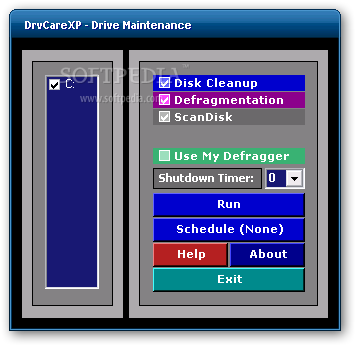
DrvCareXP is a software solution designed to make drive cleaning and scanning a breeze, providing a bunch of useful tools along with a user friendly interface.
Since we're pretty much used with today's maintenance programs that bundle loads of features, expectations are quite high.
Well, DrvCareXP isn't quite impressive as it is more like a simple interface that gives you quick access to a number of Windows utilities, including disk cleanup, defragmentation and scan disk.
Although it looks indeed very user friendly and straightforward when first seeing the app, extra care is recommended when using it.
First of all, keep in mind that enabling the scan disk and hitting the run button will reboot your computer without prior notice, so don't forget to save your work before opening the app.
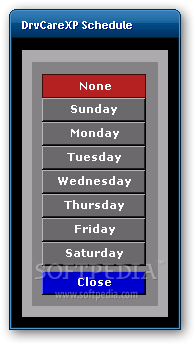
Disk Cleanup is nothing more than the standard utility included in Windows. Probably the only good thing inside the app is the fact that it comes with a tool to schedule operations. Also, in case you get yourself into some sort of trouble using this application, you can also turn to the comprehensive help manual that's included in the package.
There is a rather interesting feature to be found in DrvCareXP, namely the one that allows you to use a third-party utility for defragmenting the system. To activate it, simply check the box near 'Use My Defragger'.
Of course, DrvCareXP works smooth and fast, but don't expect revolutionary results, as the only improvements are actually the ones made by the tools built in Windows.
All things considered, its safe to say that this software works as good as the dedicated programs that come by default with your operating system. The scheduling function alongside the ability to use an external defragmenter will surely prove to be the strongest points when running DrvCareXP.
DrvCareXP 4.2
add to watchlist add to download basket send us an update REPORT- runs on:
- Windows XP
- file size:
- 717 KB
- filename:
- drvcarexpinstall.zip
- main category:
- System
- developer:
IrfanView

Microsoft Teams

Windows Sandbox Launcher

Bitdefender Antivirus Free

7-Zip

Zoom Client

calibre

ShareX

4k Video Downloader

Context Menu Manager

- ShareX
- 4k Video Downloader
- Context Menu Manager
- IrfanView
- Microsoft Teams
- Windows Sandbox Launcher
- Bitdefender Antivirus Free
- 7-Zip
- Zoom Client
- calibre