
Shutdown your computer automatically at a time period you choose. #System Shutdown #System Shutdowner #Time Schedule #Shutdown #Shutdowner #Schedule

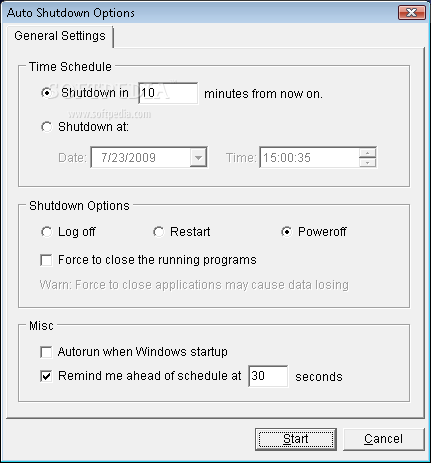
AutoShutdown is a program with a pretty self-explanatory title - it allows you to schedule a shutdown on your computer. It can be easily used by individuals of any experience level.
This is a portable software, so you don't have to install AutoShutdown. It means that you can place the tool on an external device, plug it into any computer and directly run its executable file. More importantly, no changes will be made to the Windows registry keys.
The interface of the application is based on a standard window in which you can enable the tool to turn off the computer at a specific time and date, or you can set up a countdown.
You can log off, restart, standby or hibernate the computer, set a reminder, as well as enable the tool to force close running programs and to automatically run at system startup. Plus, you can configure keyboard shortcuts and enable idle action.
The simple-to-use software takes up a low amount of system resources, has a good response time and didn't freeze, crash or pop up errors during our testing. On the other hand, there is no help file available and the interface is outdated. Nevertheless, we strongly recommend AutoShutdown to all users.
What's new in AutoShutdown 1.2.45:
- New feature to add logoff, shutdown or reboot after idle time. PS:special thanks to Steve's advice
- BugFix.
AutoShutdown 1.2.45
add to watchlist add to download basket send us an update REPORT- runs on:
- Windows All
- file size:
- 303 KB
- filename:
- autoshutdown.zip
- main category:
- System
- developer:
- visit homepage
Windows Sandbox Launcher

7-Zip

ShareX

4k Video Downloader

Bitdefender Antivirus Free

Context Menu Manager

calibre

IrfanView

Zoom Client

Microsoft Teams

- IrfanView
- Zoom Client
- Microsoft Teams
- Windows Sandbox Launcher
- 7-Zip
- ShareX
- 4k Video Downloader
- Bitdefender Antivirus Free
- Context Menu Manager
- calibre