
A program that manages various tasks for your PC. #Task Manager #Shutdown Manager #Reboot tool #Shutdown #Shutdowner #Restart

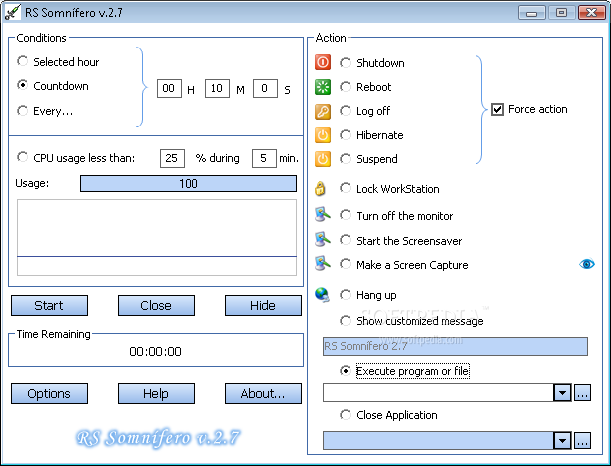
RS Somnifero is a simplistic application that allows you to schedule a power management function for your computer. It can be easily used by all individuals, regardless of their experience level.
If you are running Windows 7, then make sure to open RS Somnifero with administrative privileges. Otherwise, several errors will pop up when trying to access the “Options” area, after which RS Somnifero automatically crashes.
The interface of the software is based on a standard window in which you can get started by setting the conditions (e.g. at a specific time, countdown).
RS Somnifero allows you to shut down, reboot, log off, hibernate or suspend your computer, as well as lock the workstation, turn off the monitor and start the screensaver.
But you can also schedule the application to take a screenshot, hang up the dial-up modem, show a customized message, execute a program or file, and close an application.
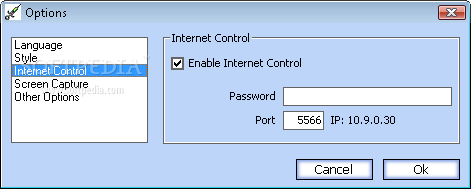
In the “Options” area you can change the interface language and style, enable Internet control, set the snapshot directory, as well as enable RS Somnifero to automatically take a snapshot before shutdown and to run at system startup.
The program takes up a very low amount of system resources (which is barely noticeable), includes a well-written help file for first-time users and has a very good response time. We haven't come across any issues during our tests and strongly recommend RS Somnifero to all users.
RS Somnifero 2.7.2005.4163
add to watchlist add to download basket send us an update REPORT- runs on:
- Windows All
- file size:
- 1.1 MB
- filename:
- rssomnifero.exe
- main category:
- System
- developer:
- visit homepage
7-Zip

Microsoft Teams

4k Video Downloader

IrfanView

Windows Sandbox Launcher

Bitdefender Antivirus Free

Context Menu Manager

Zoom Client

calibre

ShareX

- Zoom Client
- calibre
- ShareX
- 7-Zip
- Microsoft Teams
- 4k Video Downloader
- IrfanView
- Windows Sandbox Launcher
- Bitdefender Antivirus Free
- Context Menu Manager