
Fully customize the way you launch applications in Windows by placing a Mac style dock with various themes and personalization settings on your desktop. #Application launcher #Launch bar #Dock bar #Launcher #Dock #Launch

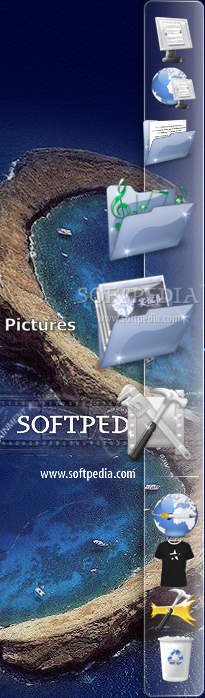
Mac OS X remains an eye-candy operating system, even if we all agree that the latest Windows versions are much more appealing as compared to the previous Windows iterations. That's why many users are still using a Mac OS X-inspired dock on their Windows workstations, and RocketDock is one of the most popular picks.
The application has been specifically developed to add a launcher dock to your desktop, being able either to work together with the Windows Taskbar or replace it completely. It's all up to the user, but after our test, we'd rather say that it's not yet possible to replace the Taskbar altogether.
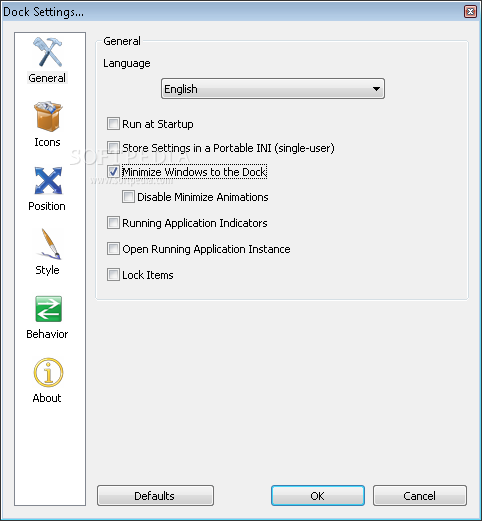
RocketDock position is fully configurable from the settings menu, so you can place it virtually anywhere on your screen. Plus, there are dedicated tools to set it always on top or always on bottom, as well as separate options to make it work on multiple monitors.
What's more important nonetheless is the behavior of the application. RocketDock works just like a genuine Mac OS X dock, with multiple zooming effects once the user moves the mouse cursor over an icon, called Bubble, Plateau and Flat.
Of course, the zoom effect can be fully customized by the user, as the utility comes with options regarding zoom width and duration.
The way it looks is again one of the things the user can change from the get-go because RocketDock supports themes and beside the ones that are already included in the package, you can also download more from the Internet.
It doesn't slow down the computer too much, but in case the app hampers performance on older machines, there's a dedicated option to reduce icon quality and thus improve speed as much as possible.
As a conclusion, there's no doubt RocketDock is one of the best apps of its kind and since it comes with so many goodies, it would be a shame not to give it at least a chance. It does not only bring a smile on the face of Mac enthusiasts, but is also a neat alternative to conventional launching methods.
What's new in RocketDock 1.3.5:
- Fixed an INI bug breaking Skin / Theme compatibility.
RocketDock 1.3.5
add to watchlist add to download basket send us an update REPORT- runs on:
-
Windows 7
Windows Vista
Windows XP
Windows 2K - file size:
- 6.2 MB
- filename:
- RocketDock-v1.3.5.exe


- main category:
- System
- developer:
- visit homepage
Zoom Client

Windows Sandbox Launcher

Bitdefender Antivirus Free

IrfanView

ShareX

Microsoft Teams

7-Zip

4k Video Downloader

Context Menu Manager

calibre

- 4k Video Downloader
- Context Menu Manager
- calibre
- Zoom Client
- Windows Sandbox Launcher
- Bitdefender Antivirus Free
- IrfanView
- ShareX
- Microsoft Teams
- 7-Zip