
Have been created in order to make it easy for users faced with a high volume of elevation tasks to keep User Account Control enabled #Elevation Tasks #Administrative Tasks #Command Prompt Here #PowerToys #Elevation #Tasks
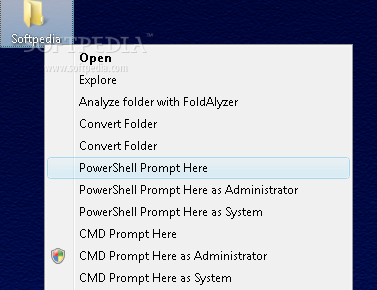
The Elevation PowerToys pack for Windows Vista was designed in order to make it easy for users faced with a high volume of elevation tasks to keep User Account Control enabled. In this sense, the PowerToys have been offering options such as: Run as Administrator for third-party scripting tools;
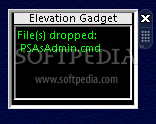
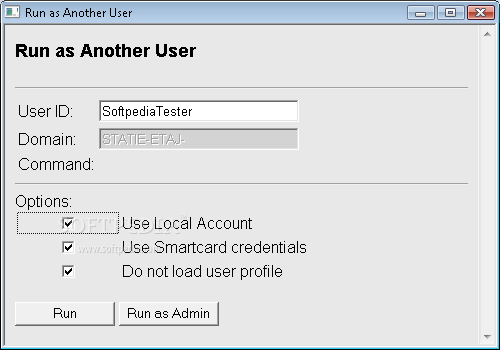
Run as Another User; Prompt Here as System for CMD and Windows PowerShell and Drag-and-drop Elevation Gadget. With Windows 7, Microsoft has relaxed UAC, allowing users more control over the level of nagging produced by the feature. However, the Elevation PowerToys could always come in handy.
User Account Control (UAC) was created to make the operating system less vulnerable to malware by having users, even those who are Administrators, run most applications with standard user privileges. UAC offers elevation potential for administrative tasks and other app functions.
This elevation potential is provided through the Run as Administrator option, which you get when right-clicking on executable files. The Elevation PowerToys that I discussed in the June 2007 issue extended this capability to work on other file and object types.
The functionality built into Windows Vista works quite well for many administrative tasks. However, one important scenario was left out for Windows Vista. Many IT departments have a policy where network administrators use one user account for their everyday tasks (using e-mail, creating documents, and the like) and another account that is used only for network administration (or local computer administration).
This is done to help lower the risk that if a network administrator accidentally runs malware doing his everyday tasks, he will not compromise his entire system—or the domain he is on. This was accomplished on Windows XP using the Run as... right-click option. But this option is gone in Windows Vista because it was replaced with the Run as Administrator option.
There are times when it is necessary to run programs in the Local System context. For example, many software distribution tools, such as System Center Configuration Manager (SCCM), use a client agent that runs as Local System to accomplish its tasks. To test the behavior of a software installation program running as Local System before attempting a distribution with a product such as SCCM, it can be helpful to start the installer using a command prompt running as Local System. I set out to create my CMD and PowerShell Prompt Here as System PowerToys.
The PowerToys may be installed individually by right clicking on the INF file, selecting Install, and approving the elevation. To uninstall them individually, use the Programs and Features Control Panel.
The only INF files in this download that do not install a PowerToy are Install_KiXtart.inf and Install_SysinternalsSuite.inf which are used to install the KiXtart 2010 scripting language and the Sysinternal Suite of utilities respectively. See the TechNet Magazine article for details.
This download also includes scripts to install or unistall all the Elevation PowerToys at once (InstallAllPowerToys.cmd and UninstallAllPowerToys.cmd). These command shell scripts can be modified to install/unistall only the utilities desired. InstallAllPowerToys.cmd does not install the PowerToys for the third-party scripting tools by default.
InstallAllPowerToys.cmd has three environment variables for controlling the installation of PowerToys that depend on the installation of either Windows PowerShell, the Sysinternals Suite, or the third-party scripting tools.
What's new in Elevation PowerToys 2.0:
- Windows PowerShell 2.0 includes an Integrated Scripting Environment (ISE). This application enables you to write, run, and test scripts and modules in a graphical environment. It has features such as syntax-coloring, tab completion, visual debugging, Unicode-compliance, context-sensitive Help, and a tabbed/multi-pane user interface.
- Windows PowerShell 2.0 adds an Edit command to the context menu options for Powershell script, module, and data file types (.ps1, .psm1, and .psd1 extensions). However, if you need to edit/test a script as an Administrator you would need to right click on the start menu icon for the ISE, run it as administrator, open the script in the editor, and navigate the Command Pane to the script’s folder to run it. So I created an Edit as Administrator PowerToy for these file types to shortcut this process. Install PowerShellEditAsAdmin.inf to use it.
Elevation PowerToys 2.0
add to watchlist add to download basket send us an update REPORT- runs on:
-
Windows 7
Windows Vista 32/64 bit - file size:
- 199 KB
- filename:
- ElevateWin7Beta.zip
- main category:
- System
- developer:
- visit homepage
ShareX

calibre

4k Video Downloader

IrfanView

Microsoft Teams

Bitdefender Antivirus Free

Windows Sandbox Launcher

Context Menu Manager

Zoom Client

7-Zip

- Context Menu Manager
- Zoom Client
- 7-Zip
- ShareX
- calibre
- 4k Video Downloader
- IrfanView
- Microsoft Teams
- Bitdefender Antivirus Free
- Windows Sandbox Launcher
