
Folder Size Shell Extension, a handy shell extension that adds a new tab to the Properties dialog that displays a folder's size.

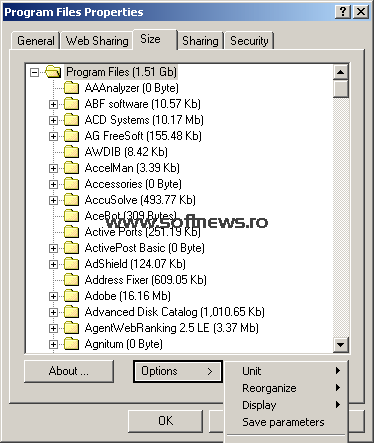
Folder Size Shell Extension is a very simple application that adds a new tab to the “Properties” screen of any folder, allowing you to view its size on the go.
In essence a shell extension, this little utility comes with no dedicated interface beside the information you can access via the “Properties” menu, which is actually a list of the folder contents along with the adjacent size.
Simply install the application and you should be ready to go. In some cases, a computer reboot is necessary, so if you can't see the “Size” tab a restart may fix the problem.
Besides showing folders sizes, Folder Size Shell Extension also comes with a few options, including “Units”, “Reorganize” and “Display”, allowing you to customize the tool just a tad.
There's no help file whatsoever, so those of you who may have problems working with the app have no other option than to try search for an answer on the web.
Folder Size Shell Extension is designed for older Windows versions, which means there are zero chances to make it work on Vista or 7. It works like a charm on 2000 and XP, but 64-bit versions are not supported at all.
Folder Size Shell Extension runs on very low computer resources; your system may not even notice that you're running it, since it's all integrated into the shell menu.
Folder Size Shell Extension is undoubtedly a reliable utility that some users might find extremely handy, but support for a wider array of operating systems is a must.
- runs on:
- Windows All
- file size:
- 166 KB
- filename:
- dfolder.zip
- main category:
- System
- developer:
- visit homepage
7-Zip

ShareX

Context Menu Manager

4k Video Downloader

Bitdefender Antivirus Free

Zoom Client

Windows Sandbox Launcher

Microsoft Teams

calibre

IrfanView

- Microsoft Teams
- calibre
- IrfanView
- 7-Zip
- ShareX
- Context Menu Manager
- 4k Video Downloader
- Bitdefender Antivirus Free
- Zoom Client
- Windows Sandbox Launcher