
Removes devices from Device Manager without putting the data stored on the connected drives in danger, also providing a console-based mode. #Remove Device #Safely Remove Hardware #Remove Drive #Remove #Device #Drive

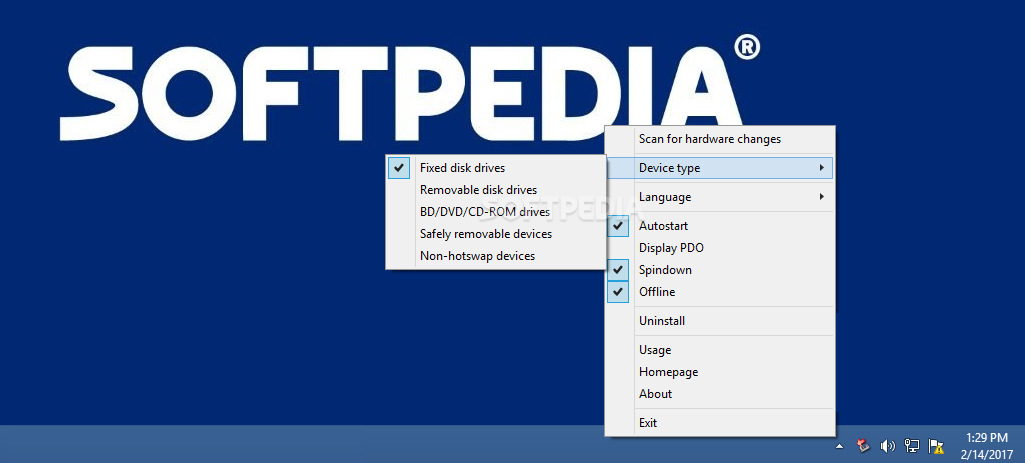
HotSwap is a lightweight application designed to help you remove devices from Device Manager with just a single click, offering exactly the same features as the built-in Windows utility.
The major different is that HotSwap places an icon in the Windows System Tray and thus allows you to control your devices on the go, without the need for opening Device Manager every time.
One of the good things about HotSwap is that it makes sure that the devices you wish to remove are not in use at the time of clicking the “Eject” button. Plus, HotSwap also comes with a dedicated option to autostart with Windows and thus provide full control over the connected devices all the time.
The application supports multiple device types, including fixed disk drives, removable disk drives, DVD/CD-ROM drives, safely removable devices and non-hotswap devices.
As you can see, the amount of configuration options is pretty limited, but HotSwap tries to promote a more user-friendly approach, making everything very easy to use even for the very beginners.
It works just fine on Windows 7 and doesn't even ask for administrator privileges, running on low resources and without slowing down the system at all.
All things considered, HotSwap is quite an interesting piece of software, but you should really pay attention to the devices you remove. HotSwap does the whole thing safely, but it provides control over multiple types of devices, so make sure you're doing the right thing before removing one of the items.
What's new in HotSwap! 6.3.0.0:
- New feature to workaround an issue where the balloon [device can now be safely hotswapped] doesn't show up when removing the device.
- New feature to support Hebrew. (Thanks to Geula for Hebrew translation)
- New feature to support Polish. (Thanks to Dmocha and Adam for Polish translation)
HotSwap! 6.3.0.0
add to watchlist add to download basket send us an update REPORT- PRICE: Free
- runs on:
-
Windows 10 32/64 bit
Windows 8 32/64 bit
Windows 7 32/64 bit
Windows Vista 32/64 bit - file size:
- 170 KB
- filename:
- HotSwap! 6.3.0.0.ZIP
- main category:
- System
- developer:
- visit homepage
Bitdefender Antivirus Free

4k Video Downloader

ShareX

calibre

Context Menu Manager

Zoom Client

Microsoft Teams

IrfanView

Windows Sandbox Launcher

7-Zip

- IrfanView
- Windows Sandbox Launcher
- 7-Zip
- Bitdefender Antivirus Free
- 4k Video Downloader
- ShareX
- calibre
- Context Menu Manager
- Zoom Client
- Microsoft Teams