
Replaces the default Windows "Open With..." dialog and enhances its functionality by listing additional programs to associate extensions with. #Open File #Context Menu #Customize Menu #Customize #Extension #Enhance

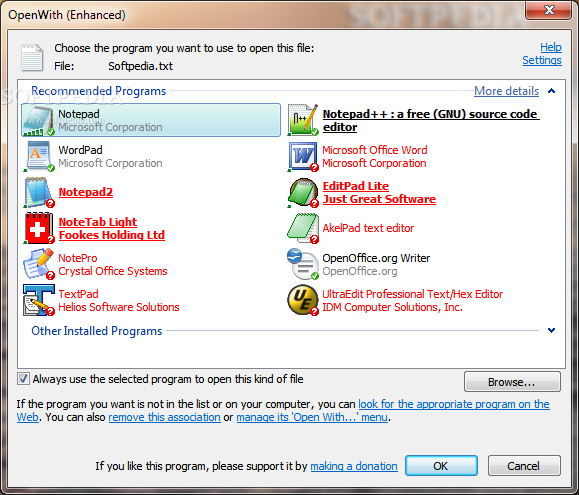
OpenWith Enhanced is a Windows application that simply replaces the default "Open with" dialog, accessible through the context menu when opening files of formats unrecognized by the operating system.
The program compiles a list of popular apps associated with the given extensions, based on the users' choice. Its installation is done in no time.
From this point on, the "Open with" displays additional programs to choose from. The ones that are not installed on your computer are highlighted in red, and OpenWith Enhanced provides you with direct access to the developers' web pages if you care to download them.
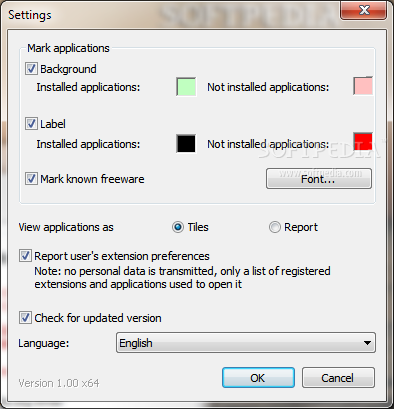
As far as program settings are concerned, it is possible to modify the default colors for the background and label (installed and not installed applications), mark known freeware, as well as view programs as tiles or a report.
You can create a list with partial extensions to handle, ask OpenWith Enhanced to report the user's extension preferences, or switch to a different language for the GUI.
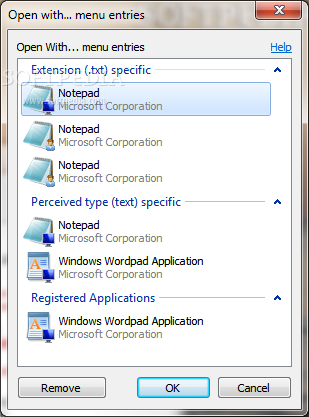
OpenWith Enhanced lets you view details on associated apps on the developer's website, remove selected associations and, more importantly, manage menu entries for specific file types.
The program does not put a strain on computer performance, using low CPU and RAM. It did not cause the OS to hang, crash or pop up error messages during our tests. However, the tool mainly relies on advertisements, which is not usually accepted by users.
What's new in OpenWith Enhanced 1.15:
- Fixed an error that prevented OWE from downloading software list off the server
- Added Chinese (Simplified) and Korean translations
- Performance and stability bugfixes
OpenWith Enhanced 1.15
add to watchlist add to download basket send us an update REPORT- runs on:
-
Windows 8 32/64 bit
Windows 7 32/64 bit
Windows Vista 32/64 bit
Windows XP - file size:
- 288 KB
- filename:
- OpenWith.1_15.exe
- main category:
- System
- developer:
- visit homepage
Microsoft Teams

Windows Sandbox Launcher

Bitdefender Antivirus Free

IrfanView

Zoom Client

ShareX

calibre

7-Zip

4k Video Downloader

Context Menu Manager

- 7-Zip
- 4k Video Downloader
- Context Menu Manager
- Microsoft Teams
- Windows Sandbox Launcher
- Bitdefender Antivirus Free
- IrfanView
- Zoom Client
- ShareX
- calibre