
Classic Start menu for Microsoft Windows 7. #Classic Start Menu #Start Menu Changer #Change Start Menu #Start Menu #Classic Start #Changer
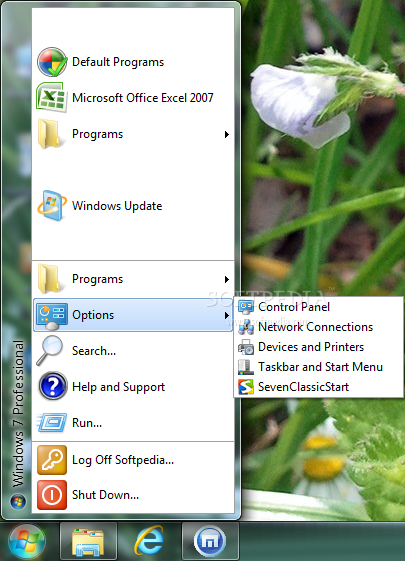
The Seven Classic Start application will add classic Start menu to Microsoft Windows 7. Seven Classic Start returns the familiar Start menu into the newest version of Microsoft Windows, making the switch easier for users of legacy systems.
Experienced users and owners of legacy versions of Windows will enjoy the easy upgrade path, while enterprises will benefit from having employees hop onto the new system without retraining. The innovative Start menu introduced with Microsoft Windows 7 leaves experienced users in the cold.
Windows 7 is the first version of Windows to drop the classic, legacy version of the Start menu in favor of the "newer and better" system. The new, controversial Start menu turns away potential users wishing to upgrade to Windows 7 yet reluctant to do so because of the drastic change to one user interface feature that is so frequently used.
Attempts to launch a familiar application turn into a hunt for the right button. For home users this is just a nuisance. For corporations, this is an extra waste of time and possible re-training of employees. Upgrade to Windows 7 without the hassle of having to learn new tricks!
Seven Classic Start returns your familiar classic Start menu back into the Windows 7 interface. Complete with all features of the genuine Start menu, Seven Classic Start is the long-awaited alternative to the new and unwelcome launch system.
Seven Classic Start simplifies and streamlines the upgrade path when upgrading to Windows 7 by eliminating the need to learn the new Start menu. Compatible with Home, Professional, Business, and Ultimate 32 and 64-bit editions of Windows 7.
Limitations in the unregistered version
- 7 days trial
- Nag screen
What's new in Seven Classic Start 1.75:
- Seven Classic Start running under 32-bit Windows works faster now.
- A few minor bugs have been fixed.
Seven Classic Start 1.75
add to watchlist add to download basket send us an update REPORT- runs on:
-
Windows 2008 R2
Windows 7 32/64 bit - file size:
- 1 MB
- filename:
- SevenClassicStart_Setup.exe

- main category:
- System
- developer:
- visit homepage
calibre

Windows Sandbox Launcher

Zoom Client

IrfanView

Microsoft Teams

Context Menu Manager

4k Video Downloader

Bitdefender Antivirus Free

ShareX

7-Zip

- Bitdefender Antivirus Free
- ShareX
- 7-Zip
- calibre
- Windows Sandbox Launcher
- Zoom Client
- IrfanView
- Microsoft Teams
- Context Menu Manager
- 4k Video Downloader