Search Perform an advanced search query SOFTPEDIA
 
SOFTPEDIA
Updated one minute ago
HomeSubmit a program for being reviewedAdvertise on our websiteGet help on surfing our websitesSend us your feedbackGet information about our XML/RSS backend and how to use itBrowse the news archiveVisit our discussion forumVizitati forumul in limba romana


Program Finder NormalFreeware onlyShareware only

ShellEnhancer 3.0.0.91 Report spyware 

Click to download ShellEnhancer
View more ShellEnhancer screenshots (2)
 Downloads: 2,211
Rating: Good (3.2/5) | Rated by: 22 user(s)
Add to download basket     Send us update information
 Developer: NuonSoft | More programs by this producer
 License: Freeware  
 Size / OS: 2.50 MB, Windows All
 Last Updated: December 22nd, 2006, 20:38 GMT
 Category: C: \ System \ OS Enhancements
 Read user reviews (0) Add a review Refer to friend Subscribe
    Download ShellEnhancer

ShellEnhancer description
An application designed to enhance the default shell of Windows and to make your life easier

ShellEnhancer is a program that was developed for enhancing the default shell of Windows and to make your life easier.

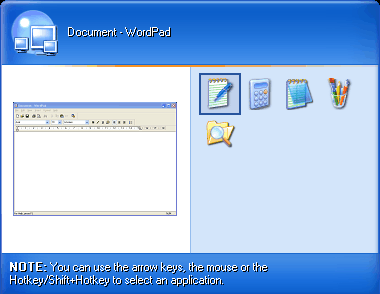
ShellEnhancer includes two types of taskswitcher (Enhanced TaskSwitcher and Mosaic TaskSwitcher) which you can use to replace the default Windows Alt+Tab taskswitcher.

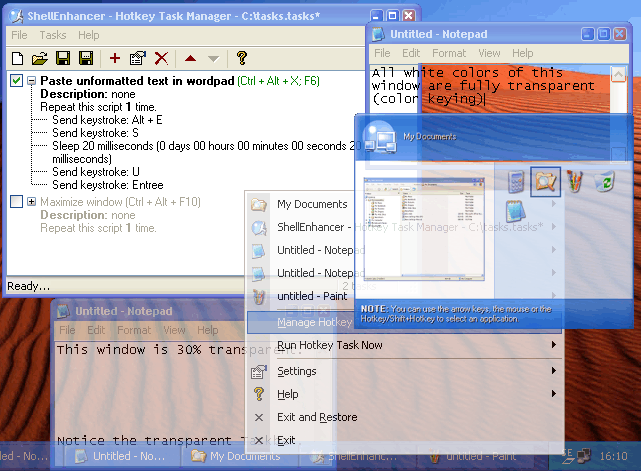
ShellEnhancer allows you to make your own tasks. Tasks consist of a number of commands which get executed one after the other. Available commands include: insert text, send keystroke, manipulate windows, run program, start screensaver, lock workstation and many other.

Tasks can be executed with hotkeys, mouse gestures or screen corners. An OSD can be shown when a task is run. With X-Window style moving and resizing you don't have to move your mouse to a corner of a window to move or resize it.

Here are some key features of "ShellEnhancer":

· Rolling up windows
· Making any window transparent
· Always on top
· Keep focus
· Run tasks with Mouse Gestures.
· Run tasks with Screen Corners.
· Enhanced TaskSwitcher now includes a list layout.


What's New in This Release:

· Major rewrite of the backend, making it much more stable and fixing the applications crashes like for Java applications, Winamp...
· Because of this, ShellEnhancer now requires Windows XP or later.
· Live Preview: continuously update the little preview in the Enhanced Alt+Tab Taskswitcher.
· Full Windows XP native Unicode support.
· Major fixes for the Shell Enhanced Applications feature, especially when applied to windows of Windows Explorer.
· The mouse-screen-corner feature now fully supports multi-monitor systems.
· Lots of new features for the Enhanced Alt+Tab TaskSwitcher.
· Option to draw mouse gesture trails on screen when drawing a mouse gesture.
· Option to rollup windows by double clicking on titlebar.
· More options for the On Screen Display (OSD).
· Minimized-to-tray windows icons are restored when ShellEnhancer is restarted after it crashes.... [ read full changelog ]


Softpedia guarantees that ShellEnhancer 3.0.0.91 is 100% FREE, which means it is a freeware product (both for personal and commercial use) that does not contain any form of malware, including but not limited to: spyware, viruses, trojans and backdoors.

This software product was tested thoroughly and was found absolutely clean, therefore it can be installed with no concern by any computer user.

However, it should be noted that this product will be retested periodically and the award may be withdrawn, so you should check back on this page from time to time. (click here for more information)


Related downloads IT News Popular downloads New additions   Latest reviews  
Aston 1.9.6
Replaces your desktop and delivers new features
Visual Task Tips 3.3
Visual Task Tips was designed to be a simple lightweight shell enhancement utility
Fast Explorer 2008 3.0.10.395
This utility allows you to manage context menu items of the file objects
Aston2 Menu 1.2
A software application designed to be a replacement for Windows start menu
Just Click 1.2.0.1390
Just Click is a shell enhancement tool for windows that makes your life easier
FolderBox 1.2
FolderBox displays additonal folders inside Windows- and Internet-Explorer
Fast Folder & Command 1.0
Fast Folders is a shell enhancement that gives you fast access to your favorite folders
Select Ex 2000
SelectEx is Windows shell extension which expands Explorer's Save and Open as dialog box's file selection abilities.
Right Click Commander 2000 2.3.0
Right Click Commander 2000 is a unique file and folder utility that has some exclusive features, never seen in file management

go to top Use the following code to link to this page:


Welcome!
Hello, Guest

Login if you have a Softpedia.com account.

Otherwise, register for one.

Main categories:
  • Antivirus
  • Compression tools
  • CD/DVD Tools
  • Office tools
  • Programming
  • Authoring tools
  • File managers
  • Desktop Enhancements
  • Internet
  • Network Tools
  • IPOD TOOLS
  • Mobile Phone Tools
  • Multimedia
  • Tweak
  • System
  • Security
  • Others
  • Science / CAD
  • UNIX
  • Windows Widgets
  • PORTABLE SOFTWARE

  • Week's best:
  • Adobe Media Player 1...
  • Registry Mechanic 8....
  • BitSpirit 3.3.2.263
  • AnyDVD 6.4.5.6
  • Firefox 3.0.1 / 2.0....
  • AutoCAD 2009
  • Norton AntiVirus 200...
  • Norton Internet Secu...
  • The Bat! Professiona...
  • WinRAR 3.80 Beta 3 /...
  • GMail Drive shell ex...
  • DAEMON Tools Lite 4....
  • UBCD4WIN 3.2.0
  • Adobe Reader 9.0.0 /...
  • Total Commander Ulti...
  • System Mechanic 8.0....
  • Adobe Acrobat Profes...
  • iPhone PC Suite 1.0....
  • Portable Firefox 3.0...
  • MPlayer for Windows ...
  • Vista Codec Package ...
  • Windows Live Messeng...
  • WinBubble 1.73
  • Kaspersky Anti-Virus...
  • Malware Removal Tool...
  • Royale Noir Theme fo...
  • IBM Lotus Symphony 1...
  • Adobe Dreamweaver 10...
  • Adobe Fireworks 10.0...
  • BitDefender Total Se...
  • © 2001 - 2008 Softpedia. All rights reserved.
    Softpedia™ and Softpedia™ logo are registered trademarks of SoftNews NET SRL.
    Copyright Information | Privacy Policy | Terms of Use | Contact Softpedia | Update your software | Archive