
Identify unknown devices in your system and search for workable drivers using this simple and straightforward application for all user levels #Driver identifier #Identify device #Hardware identifier #Identify #Driver #Identifier

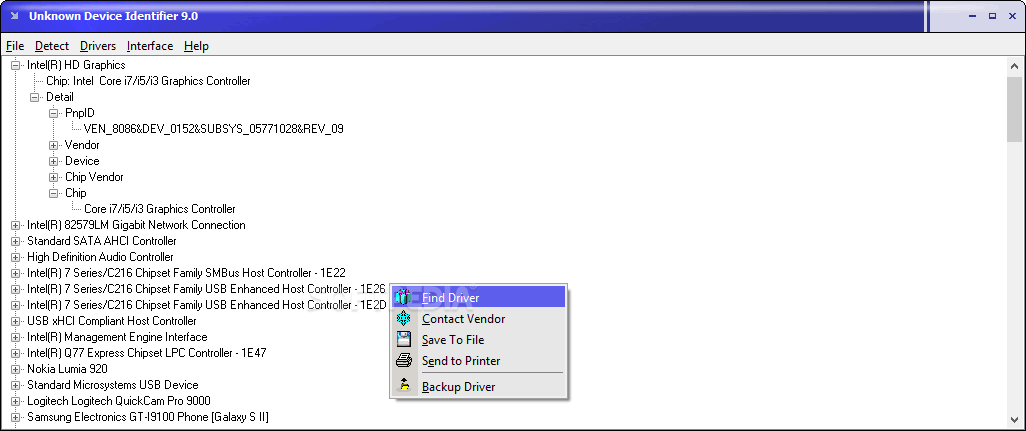
Unknown Device Identifier is a fast and straightforward piece of software that can identify unknown devices on your computer in order to search for their latest updates. It features an intuitive set of options which make the app accessible to all types of users, even the ones less experienced with such software.
The installation procedure does not take a long time to finish. As far as the interface is concerned, Unknown Device Identifier is wrapped in a regular window with a plain and simple structure. It takes a while to load all devices at startup.
They are listed in a hierarchical view with driver names and details. This list can be printed or saved to a plain text document for further evaluation and safekeeping.
For each selected device, Unknown Device Identifier can look up its driver name on Google, as well as bring up the vendor address to contact them. There are no other notable options provided by this software utility.
Unfortunately, Unknown Device Identifier does not comes with an online database to automatically find and download drivers. The backup feature shown in the right-click menu is not integrated into the program, since it requires the installation of another app made by the same developers.
As expected, it does not put a strain on PC performance, since it runs on low CPU and memory. It has a good response time and takes a reasonable amount of time to finish a scan job concerning identified drivers, during which is looks as if it's frozen. However, no error dialogs were shown in our tests, and the program did not hang or crash.
In conclusion, Unknown Device Identifier can only be used for its main goal: identify unknown devices. For the next part of finding, downloading and installing drivers you should look for another, more powerful application.
What's new in Unknown Device Identifier 9.01:
- Troubleshoot unknown devices on Windows 10
Unknown Device Identifier 9.01
add to watchlist add to download basket send us an update REPORT- runs on:
- Windows All
- file size:
- 1.2 MB
- filename:
- UnknownDeviceIdentifier.exe
- main category:
- System
- developer:
- visit homepage
ShareX

Bitdefender Antivirus Free

4k Video Downloader

Zoom Client

IrfanView

Context Menu Manager

calibre

Windows Sandbox Launcher

Microsoft Teams

7-Zip

- Windows Sandbox Launcher
- Microsoft Teams
- 7-Zip
- ShareX
- Bitdefender Antivirus Free
- 4k Video Downloader
- Zoom Client
- IrfanView
- Context Menu Manager
- calibre