
Lock mouse buttons and functions, and keyboard input with great ease, with the help of this lightweight and non-obtrusive application #Keyboard lock #Mouse lock #Lock system #Lock #Lockdown #Keyboard

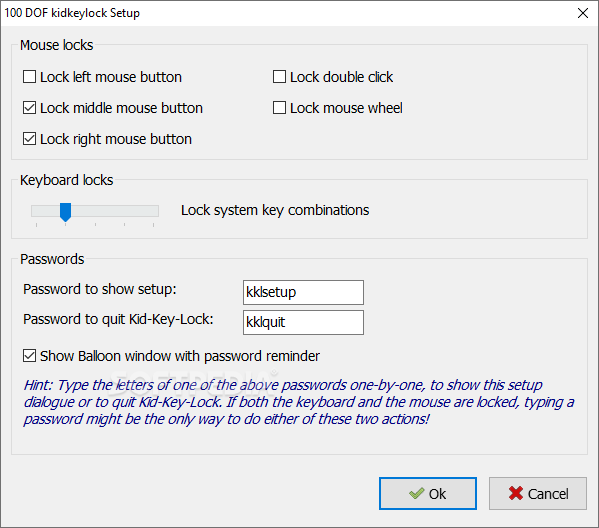
Portable Kid-Key-Lock is a tiny software program that was developed in order to aid individuals in locking their keyboard and mouse buttons.
This is the portable version of Kid-Key-Lock, which means that the installation process can be skipped. As a result, the Windows registry and Start menu/screen are not going to suffer any kind of changes, and there will be no leftovers after its removal.
Another important aspect to take into consideration is that by placing the program files to an external data device, such as a USB flash drive, you make it possible to run Portable Kid-Key-Lock on any computer you have been granted access to.
This software utility goes in the system tray from the first launch, and by right-clicking on the icon present there you bring up a context menu which enables you to access Help contents and the settings panel, view information about the developer and exit from the program.
It lets you lock the left, middle and right mouse buttons, as well as the double-click action and the mouse wheel. When it comes to the keyboard, you can set different levels of restrictions. To be more precise, you can lock only system key combinations, all keys except character keys and arrows, all keys or none at all.
In order to lock and unlock your system, you are required to input a passkey, which can be changed at any point, from the settings panel. Moreover, you can show or hide a balloon tip with the password reminder.
To conclude, Portable Kid-Key-Lock is a useful piece of software when it comes to blocking input from your keyboard and mouse. The computer’s performance is not impeded, the response time is good, yet the lack of further options might ward off some users.
What's new in Portable Kid-Key-Lock 2.4:
- Removed buggy "hide mouse pointer" option.
- Fixed broken links in about box.
Portable Kid-Key-Lock 2.4
add to watchlist add to download basket send us an update REPORT- PRICE: Free
- runs on:
-
Windows 10 32/64 bit
Windows 8 32/64 bit
Windows 7 32/64 bit
Windows Vista 32/64 bit
Windows XP 32/64 bit - file size:
- 851 KB
- filename:
- 100dof_kidkeylock.zip
- main category:
- Portable Software
- developer:
Bitdefender Antivirus Free

Zoom Client

7-Zip

calibre

Context Menu Manager

ShareX

IrfanView

Windows Sandbox Launcher

Microsoft Teams

4k Video Downloader

- Windows Sandbox Launcher
- Microsoft Teams
- 4k Video Downloader
- Bitdefender Antivirus Free
- Zoom Client
- 7-Zip
- calibre
- Context Menu Manager
- ShareX
- IrfanView