
Small-sized, portable and free software tool that displays the list of all applications that are loaded automatically when Windows boots. #Startup manager #Startup organizer #Manage startup #Startup #Manager #Organizer

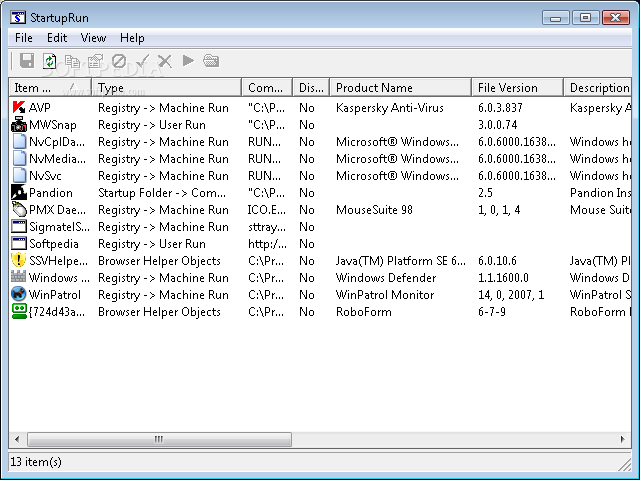
StartupRun shows all programs that automatically run at system startup, letting users save the list to file, as well as to disable or remove entries. It comes in a lightweight package.
This is a portable tool, so installing it is not necessary. You can drop the app files in any place on the hard disk and click the EXE to run.
Another option is to save StartupRun to a USB pen drive or other mass storage device, in order to run it on any PC effortlessly and without previous installers.
What's more, the tool does not create new entries in the Windows registry or Start menu, leaving the disk clean after removal.
The interface is user-friendly, consisting of a single window with an intuitive layout. All entries which automatically run at Windows boot are loaded in a list at startup.
Information includes the entry type, path, product name, file version, description and company name, among others. It is possible to copy data to the Clipboard or save it to TXT, HTM or HTML format for furter analysis.
You can disable an autorun app or remove it from the list, use a search function when dealing with large amounts of data, as well as to display grid lines.
We have not encountered any difficulties in our testing, as StartupRun did not hang, crash or pop up errors. It worked smoothly and used low CPU and RAM.
Although it is not strongly featured, StartupRun servers its purpose when it comes to displaying information on autorun entries.
What's new in StartupRun 1.22:
- New column: File Created Date
StartupRun 1.22
add to watchlist add to download basket send us an update REPORT- runs on:
- Windows All
- file size:
- 29 KB
- filename:
- strun.zip
- main category:
- System
- developer:
- visit homepage
Windows Sandbox Launcher

ShareX

7-Zip

calibre

4k Video Downloader

IrfanView

Bitdefender Antivirus Free

Context Menu Manager

Zoom Client

Microsoft Teams

- Context Menu Manager
- Zoom Client
- Microsoft Teams
- Windows Sandbox Launcher
- ShareX
- 7-Zip
- calibre
- 4k Video Downloader
- IrfanView
- Bitdefender Antivirus Free
