
Create a backup of your Windows Product Key without the risk of having it misspelled with the help of this handy software application. #View product key #Product key viewer #Change OEM #Product key #Change #View
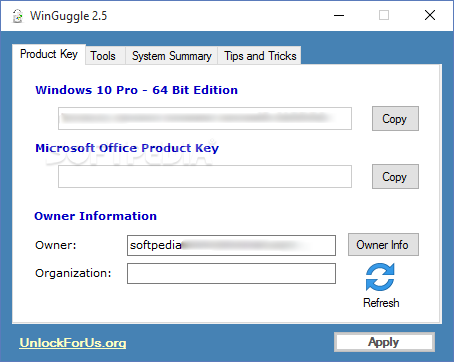
When users want to create a backup of their license numbers, they typically copy and paste them to a secure location. But Windows license cannot be copied the traditional way, so it will need to be written manually to the new file, thus risking to misspell it. Luckily, there is an application that can do this automatically, and it is called WinGuggle.
This software offers users the possibility to simply press a button and get their Windows or Office suite keys straight into Windows clipboard. From there on, a simple paste in any text file will do the trick, and the unlock codes will be safe.
WinGuggle comes with a well structured interface where each of its functions is displayed in a new tab. Even though its main purpose is to help users retrieve their serial keys, it can also be used to customize their OS.
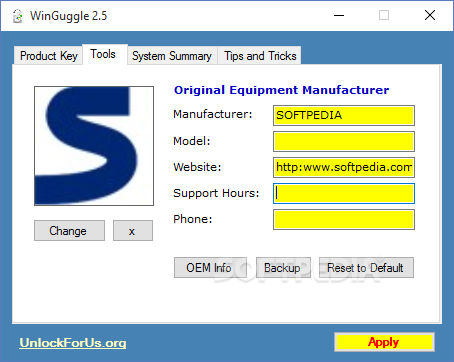
For example, users can replace the default OEM (Original Equipment Manufacturer) logo with a picture of their liking, or they can even change the manufacturer name, website and phone number, all without affecting the stability of their computer. When this personalization is no longer wanted, restoring the standard settings can be achieved by simply pressing a button.
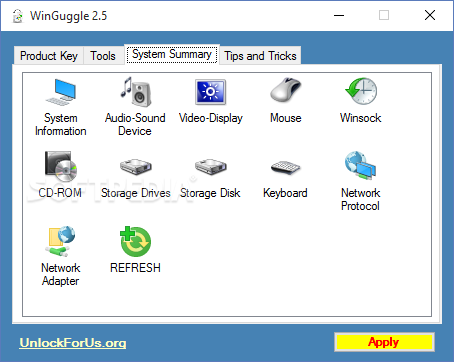
Another tab within the main window of WinGuggle will permit users to easily explore data about various Windows devices, so they can be at hand whenever details about the network adapter, the system hardware, the storage devices or the mouse are required. In other words, this information is stored in a single place.
To sum it up, WinGuggle saves time on more than one level, as it retrieves the serial number with no effort from the user, at the same time providing safe OEM changes. It can also bring together information from multiple PC areas.
What's new in WinGuggle 2.5:
- added dxdiag and msinfo32 functionality for Windows 10 (at least .net 2.0 is needed)
- Office Product Key Recovery for future versions was added
- other Bug fixes
WinGuggle 2.5
add to watchlist add to download basket send us an update REPORT- runs on:
-
Windows 10 32/64 bit
Windows 8 32/64 bit
Windows 7 32/64 bit
Windows Vista 32/64 bit
Windows XP 32/64 bit - file size:
- 155 KB
- filename:
- winguggle25.zip
- main category:
- System
- developer:
- visit homepage
ShareX

4k Video Downloader

IrfanView

Windows Sandbox Launcher

7-Zip

Zoom Client

Microsoft Teams

Context Menu Manager

Bitdefender Antivirus Free

calibre

- Context Menu Manager
- Bitdefender Antivirus Free
- calibre
- ShareX
- 4k Video Downloader
- IrfanView
- Windows Sandbox Launcher
- 7-Zip
- Zoom Client
- Microsoft Teams
